Vidnoz AI: 9 Powerful Features That Make AI Video Creation Easier
Creating professional video traditionally requires cameras, microphones, actors, editing software and considerable production time. Vidnoz AI approaches the process differently by combining artificial intelligence avatars, synthetic voices, templates, scripts, translation and video editing tools inside an online platform. Users can prepare a script, select a presenter and voice, arrange scenes and generate a finished video without recording every scene manually. This makes the platform particularly relevant for marketing teams, educators, trainers, content creators and businesses that need to produce video content regularly.
What Is Vidnoz AI?
Vidnoz AI is an online artificial intelligence video creation platform designed to turn scripts, prompts, presentations and other content into videos.
Instead of requiring a person to stand in front of a camera for every production, the platform provides digital avatars that can speak prepared scripts using artificial intelligence generated voices.
Its current toolset extends beyond basic avatar videos.
Users can work with features for:
• AI avatars
• Text to video creation
• Prompt to video generation
• AI voiceovers
• Talking photos
• Video translation
• AI script generation
• Subtitles
• Media libraries
• Brand assets
• Team collaboration
• Video analytics
According to Vidnoz’s current pricing information, the platform offers more than 3,200 video templates. Paid plans list more than 1,900 studio avatars and more than 2,660 voices, while the free plan includes a smaller selection of avatars and voices.
This makes it more accurately described as a video production environment rather than a single AI generator.
How Does Vidnoz AI Work?
The basic workflow is relatively straightforward.
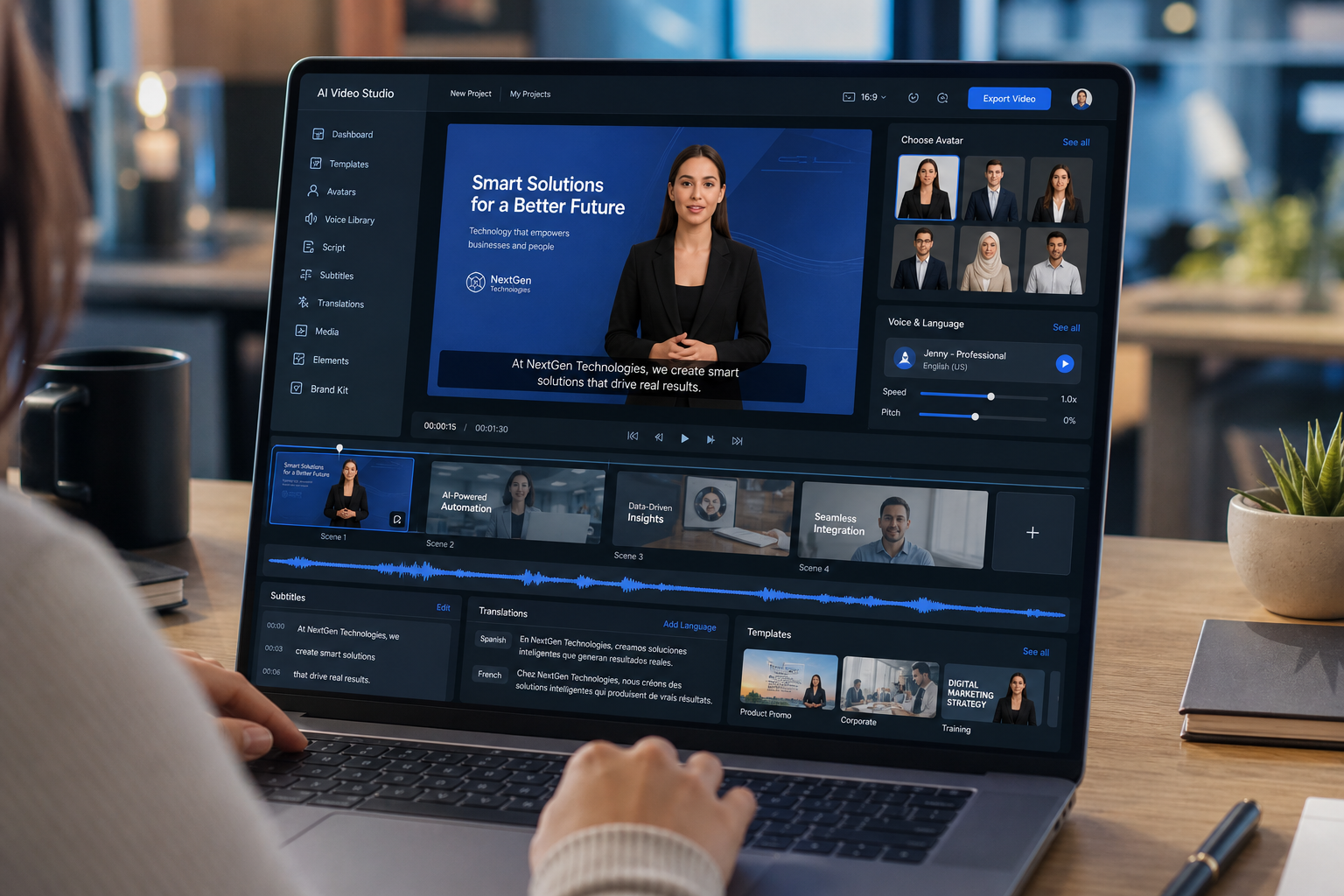
A user starts a project, selects a video template or creates scenes, chooses an avatar, enters a script and selects an artificial intelligence voice.
The platform then processes the information and creates a video in which the selected avatar presents the script.
Vidnoz describes the core workflow as choosing a template and avatar, adding a script and voice, then generating the video.
Step 1: Choose the Type of Video
The first decision is what kind of video you want to produce.
Possible projects include:
• Marketing videos
• Product explainers
• Employee training
• Educational lessons
• Social media videos
• Sales presentations
• Onboarding materials
• Tutorials
• Corporate announcements
Choosing the purpose first helps determine the appropriate layout and presentation style.
Step 2: Select an Avatar or Template
Users can select from existing digital presenters or begin from a template designed for a particular use case.
Templates can reduce the amount of manual design required.
Step 3: Add the Script
The script becomes the spoken content of the video.
It can be written manually or developed with artificial intelligence assistance.
Step 4: Choose the Voice
A suitable voice can then be matched with the avatar and intended audience.
Paid plans provide a larger voice library than the free version.
Step 5: Review and Generate
Before generating the final version, users can review scenes, text, visuals and pronunciation.
This review stage is important because artificial intelligence can accelerate production but cannot guarantee that every script, pronunciation or visual choice is correct.
1. Large Library of AI Avatars
One of the main Vidnoz AI features is its library of digital presenters.
The current official pricing page lists more than 1,800 studio avatars for free users and more than 1,900 for paid plans.
Why AI Avatars Are Useful
An avatar can act as the visible presenter of a video.
This reduces the need to arrange:
• Actors
• Cameras
• Recording locations
• Lighting equipment
• Repeated filming sessions
For businesses producing frequent training or informational content, this can simplify the production workflow.
Different Presenter Styles
The avatar library contains presenters with different appearances and styles.
This allows users to select a presenter that better suits the subject and intended audience.
For example, a corporate training video may use a professional presenter, while educational or social content may benefit from a more casual appearance.
Custom Avatar Options
Vidnoz also provides options for creating personalized digital presenters.
Its Avatar Lite feature is designed to create a digital twin, while Avatar Pro is available as a more advanced custom avatar option on eligible plans.
Use Custom Avatars Responsibly
A personalized avatar should only be created from people who have provided appropriate permission.
Artificial intelligence makes digital representation easier, but organizations should still establish clear rules around consent, identity and authorized use.
2. Thousands of Ready Made Video Templates
Starting with an empty video timeline can slow production.
Vidnoz AI currently lists more than 3,200 video templates across its plans.
Templates provide predefined layouts that can be customized with text, avatars, colors, media and other elements.
Templates Can Reduce Design Work
Templates are particularly useful when a team needs to create a large number of similar videos.
Instead of designing every scene from the beginning, creators can modify an existing structure.
Common applications include:
• Product promotion
• Business presentations
• Learning materials
• Employee onboarding
• Sales videos
• Social content
• Explainer videos
Templates Should Still Be Customized
Using a template does not mean every finished video should look identical.
Businesses should adjust:
• Brand colors
• Logo placement
• Fonts
• Script style
• Images
• Calls to action
• Presenter choice
Customization helps maintain a recognizable brand identity.
3. AI Voices and Multilingual Narration
Voice generation is another major part of the platform.
Vidnoz’s latest pricing page lists 890 voices for free users and more than 2,660 voices for paid plans.
This broad voice selection gives creators options for different languages, styles and presentation needs.
Why Synthetic Voices Are Useful
Traditional narration normally requires recording equipment and a speaker.
Artificial intelligence narration allows the script to be edited without organizing another complete recording session.
If a sentence needs changing, the creator can update the text and regenerate the relevant content.
This can be particularly useful for:
• Training updates
• Product changes
• Localized marketing
• Instructional material
• Frequently updated courses
Emotional Voice Options
Paid plans also include emotional voice capabilities designed to provide different speaking styles.
This can make narration more appropriate for different contexts than a completely neutral delivery.
Always Review Pronunciation
Artificial intelligence voices can still pronounce names, technical terminology or brand terms incorrectly.
Vidnoz includes pronunciation related controls on supported plans, but creators should listen to the final output carefully before publication.
4. Text to Video and Prompt to Video Creation
Vidnoz AI supports both text based and prompt based video generation.
The current pricing page identifies text to video and prompt to video creation through its AI Video Wizard.
Text to Video
Text to video allows users to transform prepared written content into a video workflow.
This can be useful when content already exists as:
• Scripts
• Articles
• Training notes
• Product descriptions
• Educational material
• Presentations
Instead of treating the written material and video as completely separate projects, creators can repurpose existing information.
Prompt to Video
Prompt based creation begins with a description of the desired video.
The artificial intelligence can then help establish a starting structure.
This can save time during ideation, but the generated output should still be reviewed.
Human Review Remains Important
Generative systems can occasionally produce generic wording, inaccurate information or visuals that do not match the intended message.
A strong workflow is therefore:
Generate
Review
Correct
Customize
Publish
Artificial intelligence should accelerate the process rather than remove editorial responsibility.
5. Talking Photos and Personalized Avatars
Vidnoz includes technology designed to animate photographs and make them appear to speak.
The company’s talking photo functionality combines uploaded images with voice and lip synchronization technology.
Potential Uses
Talking photo technology can be useful for:
• Creative presentations
• Educational demonstrations
• Character based content
• Promotional material
• Social media experiments
• Personalized greetings
The feature can add movement and narration to an otherwise static image.
Photo Avatars
Current Vidnoz plans also support photo avatars.
The Business plan lists unlimited photo avatar generation, while other plans have different usage limits.
Consent Is Essential
Users should not animate another person’s photograph deceptively or without appropriate authorization.
The technical ability to generate a talking image does not remove legal, ethical or privacy responsibilities.
6. AI Video Translation and Localization
Businesses frequently need the same video for audiences speaking different languages.
Recording each version separately can require considerable resources.
Vidnoz includes AI video translation features intended to make localization easier.
Its current pricing information lists one click video translation and additional subtitle translation capabilities, with language availability depending on the selected feature and plan.
Translation Can Expand Content Reach
A training video originally produced in English could potentially be adapted for other markets without filming every version separately.
Possible use cases include:
• International employee training
• Product education
• Global customer support
• Multilingual marketing
• Online courses
• Regional sales material
Translation Still Requires Verification
Automatic translation should not automatically be treated as final.
Language can change depending on:
• Industry terminology
• Cultural context
• Local expressions
• Product names
• Technical meaning
• Regional vocabulary
Organizations publishing important material should have a qualified person review translated scripts when accuracy is critical.
7. AI Script and Media Creation Tools
Good video production begins with good information.
Vidnoz includes AI script generation that can help users create or develop scripts.
The current pricing page lists limited daily AI script generation on the free plan and unlimited usage on the main paid plans.
Where Script Generation Helps
It can provide a useful starting point for:
• Video outlines
• Product introductions
• Training scripts
• Short social videos
• Explainers
• Promotional copy
The output should then be edited for factual accuracy, brand voice and audience relevance.
Integrated Media Resources
Vidnoz also lists a media library containing images, video, icons and fonts from integrated sources.
This can reduce the need to search across separate tools while assembling scenes.
AI Image Generation
Image generation is also available within the platform on eligible plans.
This helps creators produce additional visual material when existing assets do not meet a particular scene requirement.
Avoid Generic Looking Videos
The easiest AI generated video is not always the most effective one.
Replace generic visuals with:
• Real product screenshots
• Original company photography
• Genuine data
• Custom graphics
• Brand specific examples
• Relevant demonstrations
These additions can make artificial intelligence assisted videos feel more credible and useful.
8. Brand, Collaboration and Analytics Features
Vidnoz AI is not limited to individual creators.
The Business and Enterprise tiers include features aimed at teams and organizations.
According to the current pricing page, Business capabilities include brand tools, collaborative workspaces, video analytics, embedding options and team management features.
Brand Kit
A brand kit can help businesses maintain consistent visual elements across multiple videos.
This is valuable when several employees produce content.
Brand consistency may include:
• Logos
• Colors
• Standard introductions
• Outro elements
• Page branding
Team Collaboration
Business plans are designed to allow multiple users to work within shared environments.
Organizations can manage access and collaborate on video drafts.
This is particularly relevant for larger marketing or learning teams where several people review the same project.
Video Analytics
Analytics can provide information about how viewers interact with shared videos.
This can help organizations evaluate training, sales or marketing content instead of relying entirely on assumptions.
9. Flexible Export and Publishing Options
Producing a video is only part of the process.
It also needs to be distributed.
Vidnoz provides several sharing and export options depending on the subscription.
Video Resolution
The current free plan lists export up to 720p.
Starter and Business plans list 1080p video export.
Higher resolution can be important for professional presentations, training and marketing.
Watermark Differences
The free plan includes Vidnoz branding.
Paid plans provide watermark removal as part of their feature set.
This distinction matters for businesses creating client facing content.
Video Embedding
Business users can embed generated videos on websites.
Vidnoz also supports branded video pages and calls to action on eligible plans.
SCORM Export
The platform includes SCORM export on supported plans.
SCORM is commonly used by learning management systems, making this feature relevant for companies producing employee education and training material.
Is Vidnoz AI Free?
Yes, Vidnoz AI currently offers a free plan.
The free tier allows users to test the core video creation system without starting with a paid subscription.
According to the current pricing page, the free plan includes:
• More than 1,800 studio avatars
• More than 3,200 templates
• 890 voices
• Videos up to 3 minutes
• 720p export
• Text to video features
• AI script generation
The free version uses Vidnoz branding and has lower limits than paid plans.
This makes the free tier useful for testing whether the workflow fits a project before upgrading.
Vidnoz AI Paid Plans
Vidnoz currently organizes its primary video platform into Free, Starter, Business and Enterprise plans.
Pricing and promotional offers can change, so users should check the official pricing page before purchasing.
Starter Plan
Starter is designed for users who need greater production capacity than the free version.
Current listed capabilities include:
• 1080p export
• Longer videos
• More voices
• More avatar options
• Faster processing
• Watermark removal
• Higher script limits
Business Plan
Business adds capabilities intended for professional teams.
Features include:
• Voice cloning
• Video translation
• Brand kit
• Video analytics
• Collaboration
• Video embedding
• Branded video pages
• Team management
Enterprise Plan
Enterprise is aimed at organizations requiring custom capacity and additional support.
The plan includes custom usage arrangements and enterprise focused services.
Who Can Benefit From Vidnoz AI?
The platform can support several types of users.
Marketing Teams
Marketers can create product explainers, campaign videos, social content and promotional presentations.
Businesses
Companies can use avatar videos for announcements, onboarding, tutorials and internal communication.
Educators
Teachers and course creators can transform written lessons into narrated video material.
Learning and Development Teams
Training departments can create repeatable educational content and export compatible materials for learning systems.
Content Creators
Creators who prefer not to appear on camera can use digital presenters for suitable video formats.
International Teams
Translation and multilingual voice tools can help organizations adapt video content for multiple audiences.
Advantages of Using Vidnoz AI
Several practical benefits explain why AI video platforms have become popular.
Reduced Need for Recording Equipment
Avatar based content can be produced without arranging traditional filming for every video.
Faster Editing of Spoken Content
Changing a script can be easier than recording an entire presentation again.
Consistent Presentation
Organizations can maintain the same presenter, voice and visual structure across repeated training or informational videos.
Multilingual Options
Artificial intelligence voices and translation can simplify localization.
Accessible Entry Point
The free plan allows users to experiment with the workflow before deciding whether professional features are necessary.
Limitations to Consider Before Using Vidnoz AI
Vidnoz AI can simplify video production, but it is not appropriate for every type of content.
AI Avatars Are Not Identical to Real Presenters
Digital presenters may work well for training and informational videos, but content based heavily on personal emotion or authentic human interaction may benefit from real footage.
Generated Scripts Require Fact Checking
Artificial intelligence generated text can contain errors.
Important business, educational, medical, financial or technical information should always be independently verified.
Translation Needs Human Review
Automatic translations can miss context.
High importance material should be checked by someone fluent in the target language.
Free Plan Limitations
The free version has shorter video limits, fewer premium capabilities and Vidnoz branding.
Professional teams may therefore need a paid plan.
Ethical Use Matters
Voice cloning, talking photos and personalized avatars should only be used when appropriate rights and permissions are available.
How to Get Better Results From Vidnoz AI
Good results depend on more than selecting an avatar and clicking generate.
Write for Spoken Delivery
A script intended for video should sound natural when read aloud.
Use:
• Short sentences
• Clear transitions
• Direct explanations
• Natural vocabulary
• Appropriate pauses
Avoid writing the script exactly like a long academic article.
Keep Scenes Focused
Each scene should communicate one main idea.
Trying to place too much information on screen at once can make the video difficult to follow.
Match the Avatar to the Topic
Choose a presenter whose appearance and delivery fit the context.
A corporate training course may require a different presentation style from a social media video.
Review Every Generated Video
Before publishing, check:
• Pronunciation
• Lip synchronization
• Captions
• Visual accuracy
• Translation
• Branding
• Factual claims
• Audio volume
• Calls to action
Artificial intelligence reduces manual production work, but final quality control remains important.
Vidnoz AI and the Future of Video Creation
AI video generation is changing how organizations approach repeatable content.
Traditional filming will remain important for interviews, documentaries, customer stories, original demonstrations and highly personal communication.
Artificial intelligence video works differently.
Its strongest advantage is repeatability.
A company can update a training script, change a product description or create another language version without recreating the complete filming environment.
This makes platforms such as Vidnoz AI especially relevant for information that changes frequently.
The most effective strategy is not necessarily choosing between artificial intelligence and traditional video.
Many organizations can use both.
Real footage can provide authenticity, while artificial intelligence tools can handle repetitive or scalable production.
Frequently Asked Questions
What is Vidnoz AI?
Vidnoz AI is an online AI video creation platform that combines digital avatars, synthetic voices, templates, scripts, translation and editing tools.
Is Vidnoz AI free to use?
Yes. Vidnoz AI currently offers a free plan with limited video duration, 720p export, AI avatars, templates and voices.
How many avatars does Vidnoz AI offer?
The current pricing page lists more than 1,800 studio avatars on the free plan and more than 1,900 on paid plans.
Can Vidnoz AI translate videos?
Yes. Vidnoz includes AI video translation and subtitle translation features, although availability and limits depend on the selected plan.
Can I create my own avatar with Vidnoz AI?
Yes. Vidnoz provides personalized avatar options including Avatar Lite and the more advanced Avatar Pro service on eligible plans.
Is Vidnoz AI suitable for business videos?
It can be useful for training, marketing, onboarding and informational content. Businesses should still review scripts, permissions, branding and generated output before publication.
Conclusion
Vidnoz AI combines AI avatars, voices, templates, translation, script generation and editing tools to simplify video production for individuals and organizations. Its free plan provides an accessible way to test the workflow, while paid tiers add higher quality exports, larger content libraries and business focused capabilities. The platform can reduce repetitive production work, but strong scripts, accurate information, appropriate permissions and human quality control remain essential for producing professional videos.