Remove Watermark from Video: 7 Cutting-Edge AI Secrets for Crystal-Clear Video Restoration, Logo Erasing, and Seamless Content Repurposing
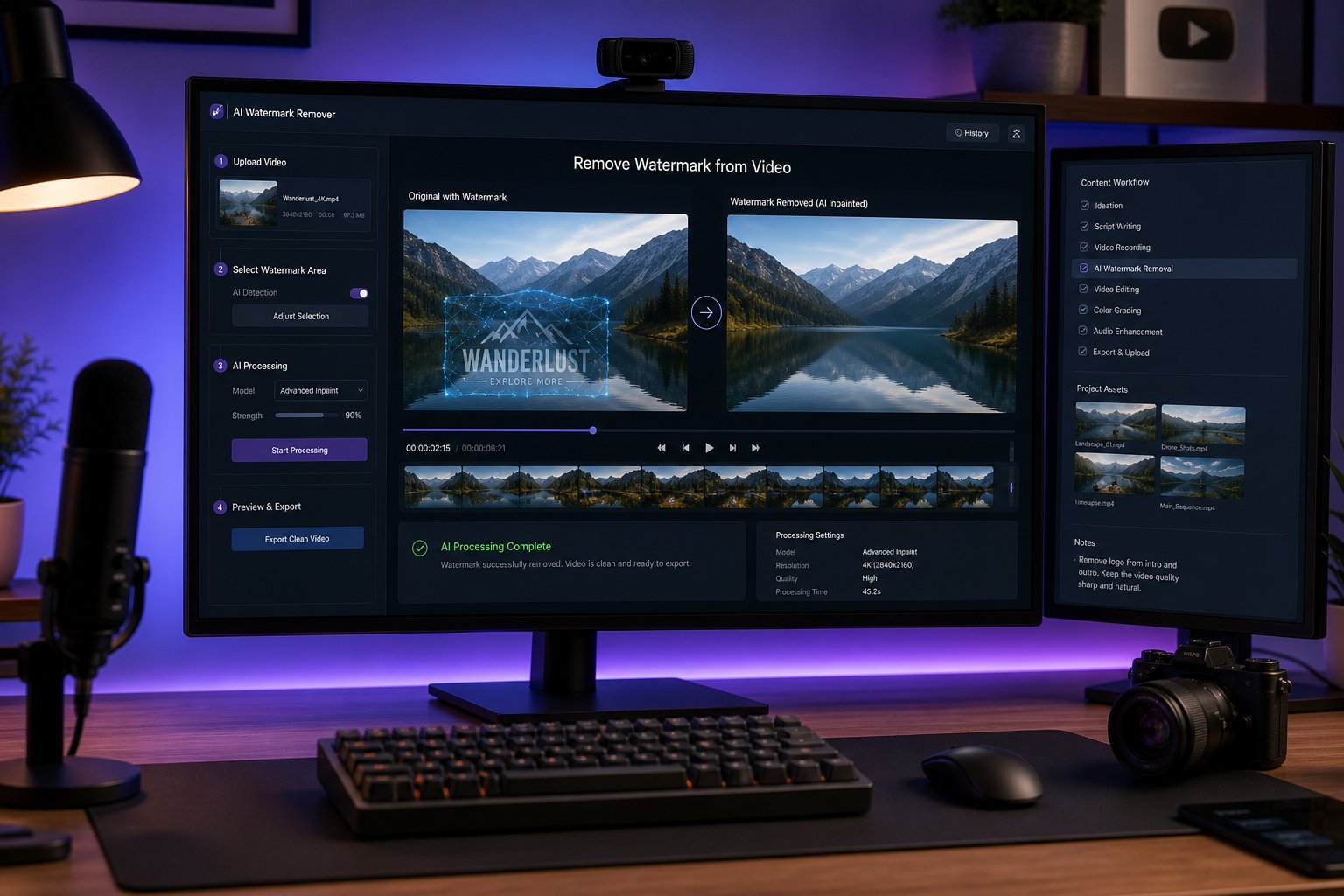
Digital video content creation moves at an unprecedented velocity across multiple distribution channels, requiring creators, marketing agencies, and media archivists to maintain clean, broadcast-ready visual assets. Learning how to efficiently remove watermark from video using browser-based artificial intelligence empowers editors to recover original footage, erase distracting broadcaster station bugs, eliminate unwanted timestamps, and clean up stock footage previews for client pitch animatics. For years, traditional video editors faced tedious manual workflows—such as applying awkward Gaussian blurs that created ugly smudged patches, cropping out critical framing areas, or laboriously tracking clone stamps across thousands of individual video frames inside high-end compositing suites. Modern deep-learning neural networks have revolutionized video restoration through temporal inpainting, allowing users to upload common file formats (such as MP4 and WebM), highlight unwanted graphical overlays, and reconstruct the occluded background pixels with remarkable photorealistic accuracy.
The Evolution of Video Watermark Removal: From Destructive Crops to Neural Inpainting
To appreciate the speed and precision of modern browser tools, one must examine the progression of video cleanup techniques.
1. Legacy Methods and Their Visual Limitations
Before artificial intelligence, editors relied on destructive spatial workarounds that compromised video quality:
- The Cropping Penalty: Cropping out a corner watermark fundamentally changes the aspect ratio of your shot, slicing off valuable visual information and reducing overall output resolution.
- Blurring and Pixelation Masks: Applying heavy Gaussian blurs or mosaic filters over a logo conceals the text but leaves an eye-catching, discolored translucent smudge that distracts viewers more than the original watermark.
- Manual Frame-by-Frame Cloning: While capable of decent results on static shots, frame-by-frame cloning across a 30-fps or 60-fps moving video sequence requires hours of tedious rotoscoping and frequently results in distracting temporal flickering.
2. Deep-Learning Temporal Inpainting Algorithms
Modern AI video restoration engines utilize spatio-temporal generative models:
- Spatial Semantic Analysis: The neural network analyzes surrounding pixels, identifying textures, gradients, lighting conditions, and structural lines adjacent to the watermark mask.
- Temporal Optical Flow Tracking: The algorithm tracks camera panning, object movement, and lighting shifts across preceding and subsequent frames. If an occluded object was visible two frames earlier or becomes visible three frames later, the system extracts those authentic pixels to fill the void.
- Artifact-Free Hallucination: When background information is completely hidden across the entire video, generative adversarial networks (GANs) or diffusion models synthesize natural, realistic textures that blend seamlessly into the moving scene.
Key Types of Overlays and Watermarks Cleaned by AI
Video assets often accumulate varied graphic layers throughout their production and distribution cycles.
1. Static Channel Bugs and Broadcaster Logos
- Corner Overlays: Television networks and streaming platforms routinely stamp opaque or semi-transparent station bugs into the top or bottom corners of video broadcasts.
- High-Contrast Vectors: AI models handle sharp, multi-colored vector logos, analyzing edge contrast to isolate the graphic without bleeding into adjacent architectural or landscape backgrounds.
2. Dynamic Moving and Bouncing Watermarks
- Anti-Theft Watermarks: Some stock agencies and social platforms deploy floating or bouncing watermarks that shift positions across the screen every few seconds to deter simple cropping.
- Dynamic Brush Tracking: Modern tools allow users to apply multi-region bounding boxes or keyframe masks that follow the path of the bouncing watermark, ensuring continuous neural reconstruction across every frame.
3. Hardcoded Subtitles, Captions, and Date Timestamps
- Camcorder & Dashcam Timestamps: Archival home video footage or security recordings often contain bright digital date and time stamps burned directly into the lower third.
- Open Captions: Removing burned-in foreign language subtitles allows localization teams to replace old text with clean, localized closed-captioning files without re-shooting the original scene.
Watermark Removal Methodology Comparison Matrix
| Restoration Method | Visual Quality Rating | Background Consistency | Processing Time | User Skill Requirement |
|---|---|---|---|---|
| AI Neural Inpainting | Superior (Photorealistic) | Excellent (Matches motion & light) | Seconds to minutes | Beginner (One-click selection) |
| Geometric Aspect Cropping | Moderate (Loses resolution) | Poor (Cuts out scene elements) | Fast | Beginner |
| Gaussian / Mosaic Blur | Low (Creates blurry smudges) | Poor (Distracting discoloration) | Fast | Beginner to Intermediate |
| Manual After Effects Cloning | High (Depends on skill) | Moderate to High (Prone to flicker) | Hours of manual work | Advanced (VFX Professional) |
| Color Tint Masking | Poor (Leaves dark boxes) | Very Poor | Fast | Beginner |
| Overlay Replacement (Logo cover) | Moderate (Hides with new logo) | N/A (Covers rather than restores) | Fast | Beginner |
Step-by-Step Guide: How to Remove a Watermark Online in Seconds
Modern web-based AI tools eliminate the need for complex desktop installations, delivering professional cleanup directly inside standard web browsers.
1. Uploading the Video File
- File Preparation: Select your source video in popular formats such as MP4, WebM, MOV, or M4V. Web-based platforms typically support video uploads up to 100MB or 500MB depending on the processing tier.
- Resolution Standards: Modern engines process standard definition, 1080p Full HD, and 4K footage while preserving the original frame rate and compression codecs.
2. Highlighting the Unwanted Overlay
- Precision Bounding Boxes: Use a simple rectangular selection tool to draw a tight bounding box around the static corner logo or timestamp.
- Custom Neural Brush: For irregular shapes, curved calligraphy, or sprawling subtitles, use an adjustable brush tool to paint over the exact contours of the text, keeping the mask tight to minimize unnecessary background recalculation.
3. Processing and Instant AI Preview
- Cloud-Based Neural Inpainting: Once initiated, powerful cloud GPUs execute spatio-temporal inpainting, calculating motion vectors and regenerating pixels across the selected timeline.
- Side-by-Side Preview: Review the rendered clip using split-screen before-and-after sliders to ensure that no ghosting artifacts or blurring remain in the cleaned area.
4. High-Definition Export
- Direct Download: Export the clean video file directly to your local workstation, completely free of watermarks, ready for editing in Adobe Premiere Pro, DaVinci Resolve, or Final Cut.
Ethical Standards, Copyright Compliance, and Best Practices
While watermark removal technology provides immense technical utility, creators must exercise legal and ethical responsibility.
Legitimate Commercial and Personal Use Cases
- Recovering Lost Master Files: Content creators frequently lose access to raw project masters, retaining only exported copies that carry legacy watermarks or client review burn-ins.
- Archival Video Restoration: Digitizing and restoring vintage family camcorder tapes, documentary footage, or public domain film reels marred by obsolete date stamps.
- Client Pitch Animatics: Temporarily removing stock footage watermarks during internal creative mood boards and concept pitches before purchasing final broadcast licenses.
Respecting Intellectual Property Rights
- Copyright Ownership: Bypassing watermarks on copyrighted material to redistribute, monetize, or misrepresent someone else’s artistic work is a direct violation of copyright laws, including the Digital Millennium Copyright Act (DMCA).
- Terms of Service Compliance: Always ensure you hold the legal rights, commercial licenses, or express permissions to modify and redistribute video assets.
Data Security and Cloud Privacy Architecture
Uploading personal or proprietary video files to online tools requires strict data privacy assurances.
End-to-End Encryption and Zero Data Retention
- SSL/TLS Encrypted Transit: High-integrity online processing platforms utilize enterprise-grade 256-bit SSL encryption to protect video uploads and downloads from interception.
- Automated Data Deletion: Trustworthy web applications do not store user footage permanently; uploaded video files and generated outputs are automatically purged from cloud processing servers within an hour of completion to safeguard user confidentiality.
Frequently Asked Questions About Removing Video Watermarks
Can I remove a watermark from a video for free online?
Yes, modern web-based AI watermark removers allow users to upload MP4 or WebM files, select the watermark area, and download a clean, restored video without installing desktop software.
Will removing a watermark blur or degrade the surrounding video quality?
Advanced AI neural inpainting analyzes adjacent pixels and motion vectors to reconstruct the original background cleanly, eliminating the blurry smudges typical of traditional filters.
Does the tool work on moving or bouncing watermarks?
Yes, specialized AI models can track moving logos across multiple video frames, continuously inpainting the background as the overlay travels across the screen.
What video formats are supported by online watermark removers?
Most online platforms support common digital video formats, including MP4, WebM, MOV, MKV, and M4V at resolutions ranging from 720p up to 4K.
Is it legal to remove watermarks from videos?
Watermark removal is completely legal when applied to footage you own, public domain material, archival family videos, or when authorized by copyright holders; however, removing watermarks to pirate or resell protected content violates copyright law.
How long does it take for AI to remove a watermark from a video?
For typical short clips (under 60 seconds), cloud GPU processing usually completes the temporal inpainting and rendering process in just 15 to 45 seconds.
Conclusion
The ability to seamlessly remove watermark from video represents a major leap forward in digital media restoration, democratizing visual cleanup tools that once required high-end visual effects studios. By replacing outdated Gaussian blurs and destructive framing crops with spatio-temporal neural inpainting, creators can effortlessly erase logos, station bugs, hardcoded subtitles, and timestamps without sacrificing video resolution. Whether you are an independent creator cleaning up your own archived footage, a social media manager repurposing multi-platform clips, or a video editor assembling client animatics, browser-based AI video restoration delivers pristine, broadcast-ready results in seconds. Embracing intelligent neural inpainting ensures your visual storytelling remains sharp, polished, and free of distracting visual clutter.