Rugged Phone: How to Choose a Durable Smartphone for Work, Travel, and Outdoor Use
A rugged phone is designed for people who need more physical protection than a conventional smartphone typically provides. These devices often combine reinforced frames, water and dust resistance, tougher screens, larger batteries, physical protection around ports, and features aimed at construction workers, engineers, outdoor travellers, delivery teams, field technicians, emergency personnel, and users who simply want a phone that can tolerate demanding environments. However, rugged does not automatically mean indestructible. The best device should balance durability with battery life, performance, connectivity, camera quality, software support, weight, size, and the specific conditions in which it will be used.
Standard smartphones have become thinner, lighter, and more elegant.
Those qualities are useful for everyday consumers.
They can be less practical in environments involving:
• Dust
• Rain
• Mud
• Construction debris
• Repeated drops
• Outdoor heat
• Cold weather
• Workshops
• Warehouses
• Remote travel
A rugged device approaches smartphone design from a different direction.
Instead of minimizing thickness at all costs, it prioritizes protection and reliability.
What Is a Rugged Phone?
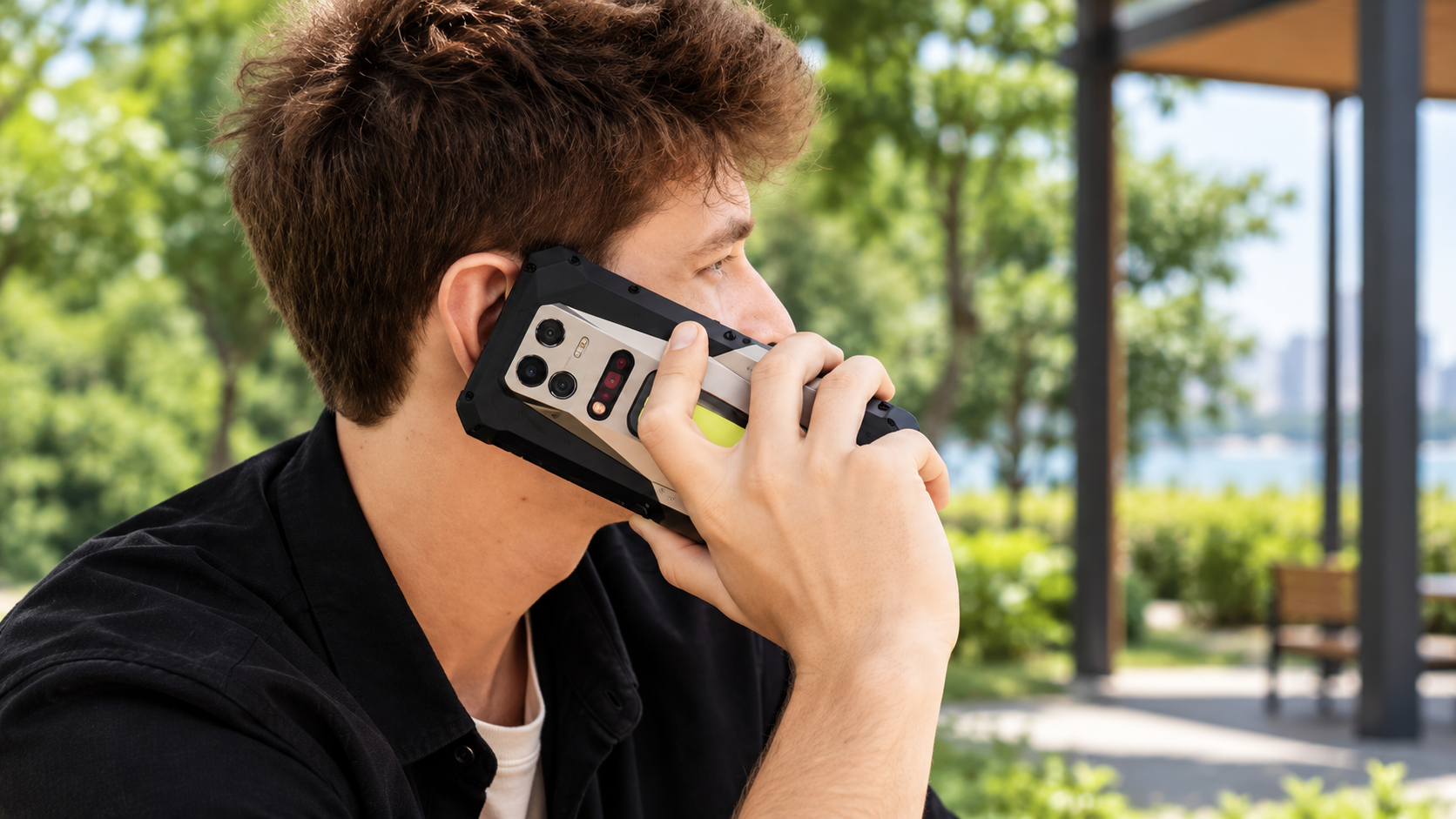
A rugged phone is a smartphone built with additional structural and environmental protection.
Typical characteristics may include:
• Reinforced corners
• Tough outer housing
• Water resistance
• Dust protection
• Stronger display glass
• Raised screen edges
• Protected charging ports
• Larger battery
• Physical shortcut buttons
• Glove-friendly controls
Some models also include specialist hardware such as:
• Thermal imaging
• Night vision cameras
• Laser measurement
• Powerful flashlights
• Barcode scanning
• Push-to-talk functionality
Not every rugged smartphone includes all of these features.
The right choice depends on the job.
7 Powerful Tips for Choosing a Rugged Phone
Durability matters, but it should not be the only specification considered.
1. Rugged Phone Protection Should Match Your Real Environment
Different users face different risks.
A construction worker may need strong dust and impact protection.
A traveller may prioritize water resistance and battery life.
A warehouse employee may care more about scanning and long shifts.
Identify the Main Hazards
Ask:
• Will the phone be exposed to rain?
• Will it regularly contact dust?
• Is there a serious drop risk?
• Will it be used around machinery?
• Does it need to survive mud?
• Will it be used in extreme temperatures?
• Is it needed in remote locations?
This creates a more useful buying checklist.
Do Not Pay for Features You Will Never Use
A specialist thermal camera may be valuable for an electrician or building inspector.
It may add little value for someone who simply wants a tougher phone for hiking.
Choose durability features around actual needs.
2. Understand IP Ratings Before Buying
Many rugged smartphones advertise an IP rating.
IP stands for Ingress Protection.
The rating helps describe resistance to solid particles and water under defined test conditions.
Common ratings on durable smartphones may include:
• IP67
• IP68
Some devices may advertise additional protection specifications.
What IP68 Generally Means
An IP68-rated device offers high dust protection and a tested level of water immersion resistance.
However, exact immersion depth and duration can vary according to manufacturer specifications.
Always check the specific product documentation.
Water Resistance Is Not Permanent
Seals can degrade over time.
Damage from drops, repairs, heat, or wear may reduce protection.
Do not assume a waterproof rating means the phone can be treated carelessly forever.
Salt Water Requires Extra Caution
Salt water is more corrosive than fresh water.
If a device is exposed to salt water and its manufacturer allows rinsing, follow the official cleaning guidance carefully.
3. Drop Resistance Matters as Much as Waterproofing
Water resistance receives a lot of attention, but accidental drops are a more common everyday problem for many users.
Rugged phones may use:
• Reinforced frames
• Protective corner bumpers
• Raised bezels
• Shock-absorbing materials
• Strong internal mounting
Raised Screen Edges Can Help
A raised bezel can reduce direct glass contact when the phone lands face-down on a flat surface.
It does not guarantee the screen cannot break.
Consider the Device Weight
Rugged construction adds mass.
A heavier phone may survive drops better, but it can also feel uncomfortable in a pocket or during long handheld use.
Balance protection and portability.
4. Battery Life Is Critical for a Rugged Phone
Large batteries are one of the strongest advantages of many rugged devices.
Capacity may be significantly higher than ordinary smartphones.
This can be valuable for:
• Remote work
• Long shifts
• Hiking
• Camping
• Delivery routes
• Field inspections
• Travel
Bigger Battery Means Bigger Phone
Battery capacity adds weight and thickness.
A very large battery can make the phone feel more like specialized equipment than a conventional smartphone.
That may be acceptable for work.
It may be inconvenient for normal daily use.
Charging Speed Matters
A large battery that takes many hours to recharge can become frustrating.
Check:
• Wired charging speed
• USB-C support
• Wireless charging where available
• Charger compatibility
• Reverse charging
Fast charging can make a high-capacity device much easier to manage.
5. Rugged Phone Performance Still Matters
Durability should not come at the expense of usability.
A phone that survives drops but struggles with basic applications is not a good tool.
Check:
• Processor
• RAM
• Storage
• Operating system version
• Software support
• Display responsiveness
RAM
More memory can help with:
• Multitasking
• Large applications
• Mapping
• Field software
• Video calls
• Business tools
Storage
Field users may store:
• Photographs
• Videos
• Offline maps
• Inspection documents
• Technical manuals
• Work applications
Choose enough storage for real usage.
Expandable storage can be useful when supported.
6. Check Connectivity for Remote and Professional Use
A rugged phone often needs to function where connectivity is less predictable.
Important features may include:
• 4G
• 5G
• Wi-Fi
• Bluetooth
• NFC
• GPS
• Dual SIM
Dual SIM
Dual SIM can be useful for:
• Work and personal numbers
• International travel
• Coverage from two networks
GPS Performance
Outdoor users may rely heavily on location services.
Accurate navigation can be valuable for:
• Hiking
• Surveying
• Delivery
• Construction
• Field operations
Offline map support can provide another layer of resilience when network coverage is poor.
7. Consider Specialist Features Before Choosing
Some rugged phones include tools unavailable on mainstream devices.
These can provide significant value for professional users.
Thermal Imaging
Thermal cameras may help identify:
• Heat loss
• Electrical hot spots
• Mechanical overheating
• Insulation problems
• Temperature differences
They can be useful for:
• Electricians
• HVAC technicians
• Building inspectors
• Maintenance engineers
Night Vision
Some devices include infrared-assisted night cameras.
These can help in low-light environments.
Applications may include:
• Outdoor exploration
• Security work
• Inspection
Programmable Buttons
A physical shortcut key can launch:
• Camera
• Flashlight
• Push-to-talk
• Scanning application
• Emergency function
This can be easier than navigating a touchscreen while wearing gloves.
Rugged Phone for Construction Workers
Construction environments can be extremely hard on electronics.
Typical hazards include:
• Concrete dust
• Metal debris
• Rain
• Mud
• Vibration
• Drops
• Gloves
A construction-focused smartphone should prioritize:
• Strong housing
• Dust resistance
• Water resistance
• Bright screen
• Large battery
• Loud speaker
• Physical controls
Screen Visibility Outdoors
A technically excellent display is not very useful if it becomes unreadable in strong sunlight.
Check brightness performance.
Outdoor workers may need to view:
• Drawings
• Messages
• Maps
• Inspection forms
in direct sun.
Rugged Phone for Outdoor Adventures
Hikers, campers, and travellers may prioritize different features.
Useful characteristics include:
• Long battery life
• Accurate GPS
• Water resistance
• Strong flashlight
• Durable construction
• Offline navigation
• Good camera
Cold Weather
Battery performance can decline in low temperatures.
Extreme environments require more careful battery management.
Keeping the phone protected from prolonged cold exposure can help.
Rugged Phones for Delivery Drivers
Delivery professionals may rely on smartphones for:
• Navigation
• Calls
• Delivery apps
• Customer communication
• Photography
• Proof of delivery
A reliable battery and bright display may matter more than extreme specialist hardware.
Useful features include:
• Fast GPS
• Strong network support
• Large screen
• Durable USB-C port
• Vehicle charging compatibility
Rugged Phones for Warehouses
Warehouse environments may benefit from:
• Barcode scanning
• Physical buttons
• Drop resistance
• Loud audio
• Long battery life
• Wi-Fi reliability
Some industrial rugged devices are specifically designed for enterprise fleet deployment.
These may provide stronger management features than consumer-oriented rugged smartphones.
Rugged Phone for Emergency and Field Teams
Field teams may require:
• Dependable connectivity
• GPS
• Long battery
• Bright display
• Push-to-talk
• Strong audio
• Water resistance
• Physical controls
In critical environments, device management and network compatibility may matter more than entertainment features.
Rugged Phone Display Quality
A rugged display should provide more than physical toughness.
Consider:
• Resolution
• Brightness
• Refresh rate
• Touch response
• Glove operation
• Wet-screen usability
Screen Protectors
Some rugged devices include factory-installed protection.
Others benefit from an additional protector.
Even reinforced glass can break.
Camera Quality on Rugged Phones
Historically, rugged smartphones sometimes sacrificed camera quality.
Modern devices can provide better photography, but performance still varies.
Check:
• Main camera sensor
• Low-light performance
• Video stabilization
• Macro capability
• Front camera
Work Photography
Professionals often need cameras for documentation rather than artistic photography.
Examples include:
• Damage records
• Site progress
• Equipment labels
• Serial numbers
• Inspections
Fast focusing and reliable detail may be more important than sophisticated portrait effects.
Thermal Camera Versus Normal Camera
A thermal sensor does not replace a standard camera.
It detects temperature differences rather than normal visible-light detail.
For professional inspection, a combination of:
• Standard image
• Thermal image
can provide more useful documentation.
Loudspeaker Quality
Industrial and outdoor environments can be noisy.
A louder speaker can improve:
• Calls
• Notifications
• Navigation prompts
• Push-to-talk
Noise cancellation for microphones can also help.
Glove-Friendly Operation
Touchscreens can become difficult to use while wearing work gloves.
Some rugged phones provide:
• Glove modes
• Programmable hardware buttons
• Larger touch targets
This can improve usability.
Rugged Phone Operating System
Hardware durability is only one part of useful device life.
Software matters too.
Check:
• Android version
• Update policy
• Security updates
• App compatibility
A physically durable device can become less useful if software support ends too early.
5G Rugged Phones
5G support can benefit users who need:
• Faster data
• Video uploads
• Cloud applications
• Video calls
• Large file transfer
However, 5G coverage varies by location.
Users working in remote environments may still rely heavily on 4G.
Dual SIM Rugged Phones
Dual SIM is particularly useful for professionals.
A worker can maintain:
• Business line
• Personal line
on one device.
Travellers can also add a local SIM while keeping their main number.
Rugged Phone Charging Ports
Charging ports can become vulnerable points.
Look for:
• Strong port design
• Protective covers where used
• USB-C
• Reliable cable fit
Port Covers
Covers can improve environmental sealing but may become annoying during frequent charging.
Some models achieve water resistance without large external flaps.
Wireless Charging
Wireless charging can reduce repeated wear on the charging port.
However, it may be slower and less efficient than wired charging.
It can still be useful in:
• Offices
• Vehicles
• Workstations
Reverse Charging
Large-battery rugged phones may support reverse charging.
This allows the phone to provide some power to:
• Earbuds
• Another phone
• Accessories
This can be useful during travel or field work.
Rugged Phone Weight
A conventional smartphone may feel noticeably lighter than a rugged model.
Before buying, consider how the phone will be carried.
Options may include:
• Belt holster
• Work vest
• Backpack
• Vehicle mount
An extremely heavy device can become uncomfortable during long days.
Thickness
Extra protection and battery capacity increase thickness.
This can improve grip for some users but make one-handed operation harder.
Users with smaller hands should pay particular attention to dimensions.
Rugged Phone Cases
A rugged phone usually has protection built into its structure.
Some users still add a case.
A case may provide:
• Extra corner protection
• Better grip
• Screen lip
However, it also adds more size.
Choose based on the environment.
Repairability
A rugged smartphone can still suffer damage.
Before buying, check:
• Service availability
• Replacement screen availability
• Battery service
• Warranty
• Spare parts
A durable phone with no practical repair support can become expensive after damage.
Warranty Limitations
Do not assume a rugged rating means every type of damage is covered by warranty.
Manufacturers may distinguish between:
• Manufacturing defects
• Accidental damage
• Water damage
• Misuse
Read warranty terms carefully.
Rugged Phone Versus Normal Smartphone With a Tough Case
This is an important comparison.
Normal Phone With Rugged Case
Advantages may include:
• Better camera
• Lighter base device
• Broader software support
• More accessories
Potential disadvantages include:
• Ports may remain less protected
• Battery may be smaller
• Internal design may not be intended for harsh environments
Dedicated Rugged Phone
Advantages may include:
• Integrated protection
• Larger battery
• Specialist tools
• Reinforced body
Potential disadvantages can include:
• Extra weight
• Larger dimensions
• Less premium camera performance on some models
The best choice depends on how demanding the environment really is.
Rugged Phone for Everyday Users
Not every rugged-phone buyer works on a construction site.
Some people simply want:
• Better battery life
• Fewer screen repairs
• More confidence during travel
• Stronger outdoor durability
A moderately rugged device may suit these users better than an extremely heavy industrial model.
How Much Should You Spend?
Price depends on:
• Processor
• Display
• Battery
• Cameras
• Thermal imaging
• Storage
• Brand support
• Enterprise features
A low-cost rugged phone can be sufficient for basic communication.
Professional users may justify paying more for:
• Better performance
• Reliable software
• Specialist sensors
• Service support
Common Rugged Phone Buying Mistakes
Buying Only for Maximum Battery Capacity
Very large batteries increase size and weight.
Ignoring Software Updates
Durable hardware still needs secure software.
Assuming Every Rugged Phone Has the Same Protection
Check actual ratings.
Buying Thermal Imaging Without a Real Use
Specialist features add cost.
Ignoring Screen Brightness
Outdoor visibility matters.
Forgetting Network Compatibility
Make sure the device works properly with the intended carrier.
Assuming Rugged Means Unbreakable
No smartphone is indestructible.
A Practical Rugged Phone Buying Checklist
Before purchasing, compare:
• IP rating
• Drop-resistance claims
• Screen protection
• Battery capacity
• Charging speed
• Processor
• RAM
• Storage
• 5G support
• Dual SIM
• GPS
• Camera quality
• Thermal imaging if required
• Display brightness
• Physical buttons
• Software updates
• Warranty
• Repair support
Rank these according to your own priorities.
Maintaining a Rugged Phone
Durability does not eliminate maintenance.
Keep the device in good condition by:
• Cleaning ports
• Removing mud and dust carefully
• Inspecting seals
• Avoiding unnecessary extreme heat
• Replacing damaged covers
• Updating software
Follow manufacturer cleaning instructions.
Do not push sharp tools into ports or speaker openings.
Frequently Asked Questions
What is a rugged phone?
A rugged phone is a smartphone designed with additional protection against demanding conditions such as water, dust, drops, vibration, and outdoor work environments.
Is a rugged phone completely waterproof?
No. Water resistance depends on the specific IP rating and manufacturer test conditions. Protection can also decline after damage or long-term wear.
Are rugged phones good for construction workers?
Yes. They can be useful for construction because reinforced bodies, dust resistance, long battery life, bright displays, and physical controls can suit challenging worksites.
Do rugged phones support 5G?
Many modern rugged models support 5G, although network compatibility and supported bands should be checked before purchase.
Can a rugged phone have a thermal camera?
Some specialist rugged smartphones include thermal imaging hardware for applications such as electrical, HVAC, building, and mechanical inspection.
Is a rugged phone better than a normal phone with a protective case?
It depends on the environment. A normal phone with a strong case may be enough for everyday protection, while dedicated rugged devices are better suited to repeated exposure to harsh work or outdoor conditions.
Conclusion
A rugged phone can provide valuable protection for people working, travelling, or spending significant time in environments where ordinary smartphones face greater risk from dust, water, drops, and long periods away from charging. The best device should balance durability with performance, battery life, display quality, connectivity, software support, cameras, and practical size. Specialist features such as thermal imaging and programmable buttons can be extremely useful when they match real professional needs. By choosing protection according to the actual environment rather than simply buying the toughest-looking model, users can find a durable smartphone that remains practical every day.