MSI Tablets: Professional Pen Display and Graphic Drawing Monitor Guide
The digital creative industry demands precision, fluid responsiveness, and color fidelity that standard input devices cannot provide. Professional illustrators, 3D sculptors, and graphic designers require hardware that translates subtle hand movements into exact digital strokes without lag or visual discrepancy. This is exactly where MSI tablets establish their critical value. Leveraging decades of display manufacturing expertise, MSI has engineered a specialized lineup of pen displays and graphic drawing monitors that integrate advanced screen technology with highly sensitive stylus systems. Furthermore, these creative solutions bridge the gap between traditional tactile artistry and modern digital efficiency. By offering exceptional color gamut coverage, ergonomic designs, and seamless software integration, they empower creators to execute their visions without technical friction. In this comprehensive guide, we will analyze the core technology, professional applications, and optimization strategies surrounding these creative displays. Ultimately, understanding these specifications enables artists and studios to make informed investments in their digital infrastructure.
Understanding the MSI Tablets Ecosystem
To properly evaluate creative hardware, professionals must first understand the fundamental distinctions between different types of digital drawing surfaces. The market offers two primary form factors, each catering to distinct workflow preferences and budget considerations. MSI focuses its engineering efforts predominantly on the premium segment that delivers the most intuitive drawing experience.
Pen Displays vs. Pen Tablets: The Core Difference
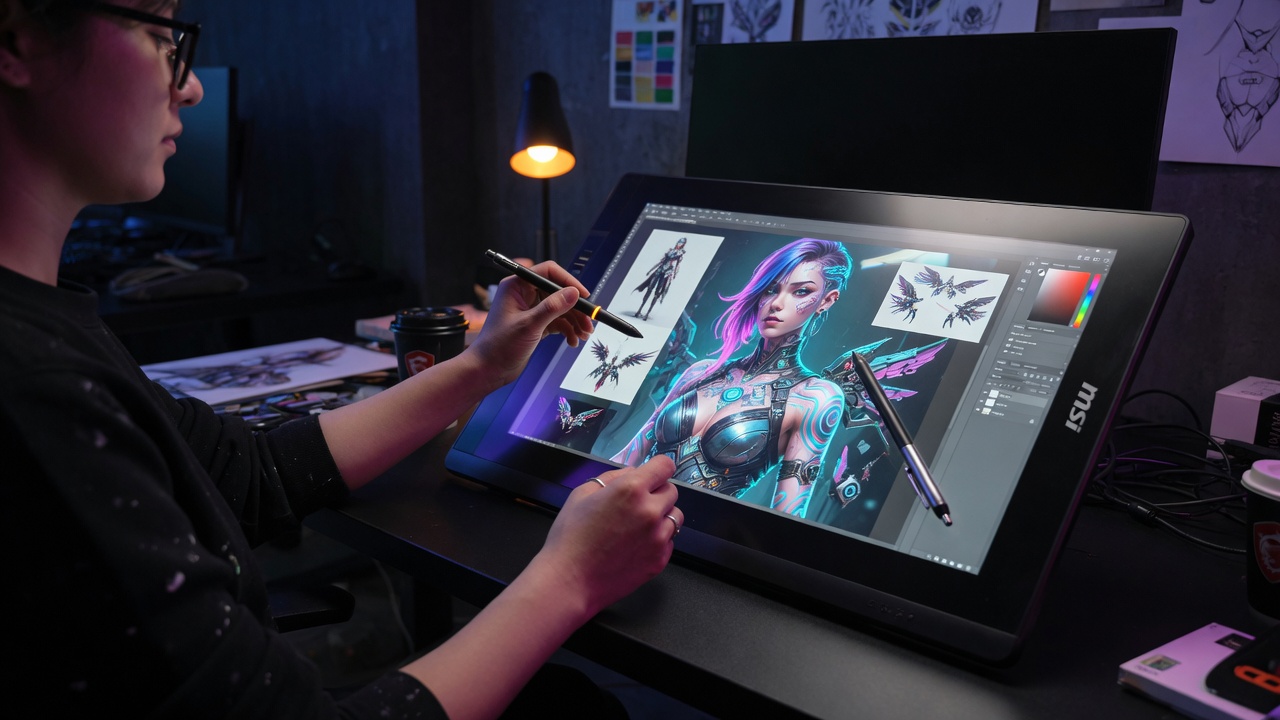
The terminology surrounding digital art hardware often causes confusion among buyers. A pen tablet refers to a surface without a screen where the artist draws while looking up at a connected computer monitor. This creates a hand-eye coordination disconnect that requires significant adaptation time. Conversely, a pen display features a high-resolution screen directly beneath the drawing surface. Artists apply the stylus directly to the screen where the pixels appear, mimicking the natural experience of drawing on paper or canvas. MSI tablets specialize in this pen display category, ensuring that creators maintain a direct visual connection to their artwork. This direct interaction drastically reduces the learning curve and enhances stroke accuracy, making pen displays the preferred choice for professional environments where production speed and precision are paramount.
The MSI Creator Series Philosophy
MSI approaches the creative hardware market through its overarching Creator series philosophy. Unlike their gaming counterparts that prioritize high refresh rates and aggressive aesthetics, the Creator products emphasize color accuracy, thermal efficiency, and minimalist professional designs. This design philosophy extends seamlessly into their drawing tablets. The engineering team calibrates each display to meet stringent industry standards before it leaves the factory. Furthermore, MSI integrates premium etched glass surfaces that provide optimal friction to simulate the drag of traditional drawing instruments. This intentional focus on the creator experience ensures that professionals receive a tool refined for artistic execution rather than a repurposed gaming peripheral.
Key Features of MSI Drawing Tablets
Professional creators evaluate digital hardware based on several non-negotiable technical criteria. A drawing monitor must deliver visual fidelity, input precision, and physical comfort during extended work sessions. MSI tablets incorporate specific features designed to excel in each of these critical areas.
Exceptional Color Accuracy and Display Quality
A display that misrepresents color undermines the entire creative process. Artwork intended for commercial print or digital distribution requires exact color values. MSI addresses this requirement by utilizing high-grade IPS panels that achieve wide color gamut coverage. Their professional displays consistently cover ninety-nine percent of the sRGB spectrum, ninety-five percent of the DCI-P3 spectrum, and often exceed ninety percent of the Adobe RGB spectrum. This extensive coverage ensures that artists can view and manipulate colors that standard monitors simply cannot reproduce. Furthermore, each unit undergoes rigorous factory calibration to achieve a Delta E value of less than two. This level of color deviation is virtually imperceptible to the human eye, guaranteeing that the colors selected on the tablet will match the final output medium, whether it is a printed magazine or a web banner.
Advanced Stylus Technology and Pressure Sensitivity
The stylus serves as the primary interface between the artist and the digital canvas. MSI tablets typically employ electromagnetic resonance technology to power the stylus, eliminating the need for internal batteries or charging cables. This ensures that the pen remains lightweight and balanced, reducing hand fatigue during intricate detailing sessions. More importantly, these styluses support up to 8192 levels of pressure sensitivity. This massive dynamic range allows software to interpret minute variations in applied force, transitioning seamlessly from hairline strokes to broad, opaque fills based entirely on hand pressure. Additionally, tilt recognition technology detects the angle at which the pen meets the screen. This feature proves essential for digital painters who rely on tilted brush strokes to create natural shading effects and textured fills using software brushes that respond to tilt orientation.
Ergonomic Design and Adjustable Stands
Professional illustrators often work for eight to ten hours daily, making physical comfort a critical hardware specification. MSI integrates robust, fully adjustable stands directly into their tablet chassis. These stands allow creators to modify the screen inclination from a nearly flat drawing angle to an upright viewing position. The ability to adjust the physical tilt prevents neck strain and allows artists to adopt healthy posture habits during marathon rendering sessions. The front bezels are designed to minimize parallax error, ensuring the cursor appears exactly beneath the pen tip. Furthermore, MSI includes specialized anti-glare coatings that reduce ambient light reflections without degrading screen sharpness or introducing excessive graininess that plagues lesser display tablets.
MSI Tablets for Professional Creative Workflows
Hardware specifications only matter in the context of real-world application. Different creative disciplines demand distinct performance characteristics from their digital tools. MSI tablets adapt competently across various professional workflows, providing tangible efficiency gains for diverse artistic specialties.
Graphic Design and Digital Illustration
For graphic designers and two-dimensional illustrators, stroke precision and color fidelity represent the most critical performance metrics. Applications like Adobe Photoshop and Clip Studio Paint rely heavily on pressure sensitivity to control brush diameter and opacity. The highly responsive stylus of MSI pen displays allows illustrators to execute complex line work with absolute confidence. Designers benefit immensely from the color accuracy when creating brand identity packages that must maintain strict visual consistency across multiple media formats. The direct screen interaction also accelerates the layout process, allowing designers to manipulate vector points and raster elements naturally without the disjointed experience of a standard mouse and monitor setup.
3D Modeling and Industrial Design
Three-dimensional artists working in software such as ZBrush, Blender, or Autodesk Maya interact with their models through complex sculpting and texturing operations. In ZBrush, pressure sensitivity directly controls the depth of sculpting strokes, making a high-quality pen tablet essential for achieving organic surface details. The tilt functionality allows 3D painters to apply textures naturally to mesh surfaces, simulating the behavior of an airbrush or angled paintbrush. Industrial designers also leverage these capabilities to sketch concept renderings directly in three-dimensional space, iterating through design variations much faster than traditional sketching methods permit. The large active area of MSI displays provides ample screen real estate to access dense 3D software interfaces while maintaining a generous viewport for the model itself.
Photo Retouching and Video Editing
Photographers and video colorists require absolute certainty that the adjustments they make on screen will translate accurately to their final exported files. The wide color gamut and low Delta E calibration of MSI tablets make them exceptionally suited for high-end photo retouching. Editors can perform delicate luminosity masking and color grading with the precision of a stylus, which offers far greater control than a mouse when brushing in selective adjustments. For video editors, the color accuracy ensures that timeline color corrections adhere to broadcast standards. While a pen display is not typically used for timeline slicing, it serves as an invaluable secondary reference monitor for color grading suites when paired with a primary editing display.
Technical Specifications That Matter
Navigating the specification sheets of creative hardware requires an understanding of how each metric impacts the artistic experience. Marketers often highlight numbers that sound impressive but offer diminishing returns for actual creative work. Professionals must identify the specifications that genuinely influence output quality and workflow efficiency.
Resolution and Pixel Density
Resolution determines the clarity of the on-screen image, but pixel density measured in pixels per inch matters far more on a pen display than on a standard monitor. Because artists position their eyes mere inches from the drawing surface, low pixel density makes individual pixels visible, creating a distracting screen door effect. MSI tablets utilize high-resolution panels, often featuring 4K UHD resolution, to ensure that lines appear razor-sharp and curves remain smooth at any zoom level. High pixel density also improves the accuracy of cursor tracking, as the system can map pen movements to a finer grid of pixels, resulting in smoother stroke rendering without visible stepping or aliasing on diagonal lines.
Color Gamut Coverage: sRGB, DCI-P3, and Adobe RGB
Different output mediums utilize different color spaces. The sRGB color space remains the standard for web content and consumer displays. DCI-P3 is the standard for digital cinema and increasingly for high-end consumer electronics. Adobe RGB encompasses a wider range of printable colors, particularly in the cyan and green spectrums, making it essential for pre-press and commercial printing workflows. When evaluating MSI tablets, creators must match the display gamut to their specific delivery requirements. A display covering ninety-nine percent of DCI-P3 provides ample headroom for cinematic video grading, while Adobe RGB coverage ensures that printed materials do not suffer from unexpected color shifts or out-of-gamut warnings during the conversion process.
Connectivity and Compatibility
A professional pen display must integrate seamlessly into existing studio setups. Modern MSI tablets prioritize streamlined connectivity, often utilizing a single USB-C cable to transmit video data, pen data, and power simultaneously. This single-cable solution dramatically reduces desk clutter and simplifies the connection process for laptop-based creators who frequently change work environments. For legacy systems, standard HDMI and USB-A connections remain available. Furthermore, driver compatibility plays a crucial role in system stability. MSI provides regularly updated drivers that ensure reliable pen performance across all major operating systems and creative software suites, preventing frustrating cursor drift or pressure curve irregularities that can disrupt complex rendering tasks.
Optimizing Your MSI Pen Display Setup
Acquiring premium hardware represents only the first step toward digital art mastery. Proper configuration and calibration unlock the full potential of the display and stylus. Professionals must dedicate time to fine-tuning their system settings to match their specific artistic preferences and environmental conditions.
Calibrating Your Display for Accuracy
Even factory-calibrated displays benefit from periodic hardware calibration using external colorimeters or spectrophotometers. Ambient lighting conditions in a studio change throughout the day, affecting how the human eye perceives on-screen colors. Utilizing calibration tools from manufacturers like X-Rite or Datacolor allows artists to create custom International Color Consortium profiles tailored to their specific workspace lighting. This process adjusts the display gamma, white point, and luminance levels to maintain consistent color reproduction. For creators who cannot afford external calibration hardware, careful software calibration using the built-in operating system utilities provides a reasonable baseline, though it cannot match the objective accuracy of hardware profiling.
Configuring Shortcut Keys and Express Keys
Efficiency in digital creation relies heavily on minimizing context switching between the drawing surface and the keyboard. Many MSI tablets include programmable express keys located on the bezel or stand. Assigning frequently used keyboard modifiers, such as Alt, Shift, or the Spacebar for canvas navigation, to these physical buttons allows artists to keep their focus entirely on the screen. Furthermore, configuring application-specific profiles ensures that these shortcut mappings adapt automatically when the user switches between Photoshop, Illustrator, and ZBrush. Some advanced setups also incorporate radial menus triggered by a single button press, providing access to dozens of additional commands without cluttering the physical workspace.
Integrating with Leading Creative Software
The final optimization step involves configuring the pen pressure curves within individual creative applications. Software like Adobe Photoshop allows users to customize how pressure translates to brush size or opacity independently of the global driver settings. A matte painter may prefer a firm pressure curve that requires deliberate force to achieve maximum opacity, providing greater control over subtle gradients. Conversely, a comic inker may prefer a lighter curve that responds dramatically to minimal pressure, facilitating rapid line weight variation. Experimenting with these software-specific curves ensures that the hardware translates the artist physical intent into the desired digital result across all utilized programs.
MSI Tablets vs. Competing Graphic Drawing Monitors
The creative hardware market features several established competitors, each with distinct engineering approaches and value propositions. Professionals often compare MSI tablets against alternatives from Wacom, Huion, and XP-Pen when upgrading their studio equipment. An objective comparison reveals specific advantages and trade-offs across these brands.
Comparing Display Technology and Color Fidelity
Wacom remains the industry legacy standard, renowned for its exceptional build quality and proprietary pen technology. However, Wacom Cintiq models often command premium prices that exceed the budgets of independent creators and small studios. MSI leverages its massive supply chain advantages as a global laptop and monitor manufacturer to deliver comparable color accuracy and panel quality at more competitive price points. Independent hardware reviews consistently demonstrate that MSI displays match or exceed the color gamut and Delta E performance of equivalently sized Wacom units. This makes MSI an increasingly attractive option for budget-conscious professionals who refuse to compromise on visual fidelity.
Evaluating Stylus Performance and Latency
Input lag represents the critical performance metric that separates professional-grade pen displays from consumer gadgets. When the visual stroke appears even milliseconds behind the physical pen movement, the drawing experience feels disconnected and imprecise. Wacom currently holds a slight edge in minimum input latency due to their highly optimized proprietary digitizer technology. However, MSI has narrowed this gap significantly through rapid digitizer refresh rates and optimized driver architectures. For the vast majority of professional workflows, including detailed illustration and 3D sculpting, the latency performance of MSI tablets falls well below the threshold of human perception, providing a fluid and natural drawing experience that meets exacting professional standards.
Assessing Value and Build Quality
Value calculations in professional hardware must account for both initial purchase price and long-term durability. MSI tablets utilize robust aluminum and high-quality plastic chassis that withstand the rigors of daily studio use. The inclusion of comprehensive connectivity options, adjustable stands, and premium etched glass surfaces out of the box enhances the overall value proposition. Competitors often require users to purchase these accessories separately, inflating the total cost of ownership. When evaluating the complete package, MSI consistently delivers one of the highest performance-to-investment ratios in the professional pen display category.
The Future of Creative Pen Displays
Digital art technology continues to evolve rapidly, driven by advancements in display engineering and computational power. The next generation of creative hardware promises to eliminate remaining workflow frictions and introduce entirely new methods of digital interaction. MSI is positioned to incorporate these advancements as their Creator ecosystem expands.
Mini-LED and OLED Advancements
Traditional IPS panels struggle to display true blacks because their backlight systems remain active even when rendering dark pixels. This limitation particularly impacts digital painters who work in dimly lit environments and require accurate shadow rendering. The integration of Mini-LED backlighting allows for thousands of localized dimming zones, drastically improving contrast ratios without sacrificing color accuracy. Furthermore, OLED technology provides per-pixel illumination, achieving infinite contrast ratios and instantaneous pixel response times. As manufacturing yields improve and costs decrease, future iterations of MSI tablets will likely adopt these advanced panel technologies, offering creators an unmatched visual experience with zero backlight bleed or color shifting at extreme viewing angles.
AI Integration in Digital Art Workflows
Artificial intelligence algorithms are already transforming how creators approach repetitive tasks. Features like neural style transfer, automated image upscaling, and intelligent selection generation reduce the time required to execute tedious production steps. Future pen displays may integrate dedicated AI processing units directly into the tablet hardware. This integration could enable real-time predictive stroke smoothing, context-aware brush selection, and instantaneous resolution scaling without relying on the host computer processing power. By offloading these computational tasks to the display itself, artists will experience immediate feedback, allowing their creative flow to remain completely uninterrupted by technical processing delays.
Conclusion
Investing in the right digital drawing hardware fundamentally alters the trajectory of a creative career. MSI tablets provide a compelling synthesis of professional-grade color accuracy, responsive stylus technology, and robust ergonomic design that meets the rigorous demands of modern digital artists. By understanding the nuances of pen display technology, calibration workflows, and software integration, creators can extract the maximum potential from their hardware investments. Whether executing detailed character illustrations, sculpting high-resolution three-dimensional models, or performing meticulous photo retouching, these displays deliver the precision and reliability that professional environments require. As display technologies continue to advance, MSI remains committed to equipping creators with the tools they need to push the boundaries of digital expression and maintain their competitive edge in an increasingly visual industry.
Frequently Asked Questions
Q1: What is the primary difference between MSI pen displays and standard drawing tablets?
A1: MSI pen displays feature built-in high-resolution screens allowing artists to draw directly on the image, while standard drawing tablets require the user to look at a separate computer monitor.
Q2: Do MSI tablets require charging for the stylus?
A2: No, the styluses utilize electromagnetic resonance technology drawing power from the display digitizer, eliminating the need for batteries or charging cables.
Q3: How many levels of pressure sensitivity do MSI drawing tablets support?
A3: MSI professional pen displays support 8192 levels of pressure sensitivity, allowing for highly nuanced stroke variation based on applied hand pressure.
Q4: Are MSI tablets compatible with Apple Mac operating systems?
A4: Yes, MSI provides fully supported drivers for macOS, ensuring seamless pen pressure and display functionality across major creative applications on Apple hardware.
Q5: What color standards do MSI Creator displays adhere to?
A5: They are factory calibrated to achieve Delta E values less than two, covering up to 99 percent of sRGB, 95 percent of DCI-P3, and exceeding 90 percent of Adobe RGB color spaces.
Q6: Can I use an MSI pen display as a primary computer monitor?
A6: Yes, beyond digital art applications, MSI pen displays function as fully capable high-color-accuracy monitors for general computing, photo viewing, and video consumption.