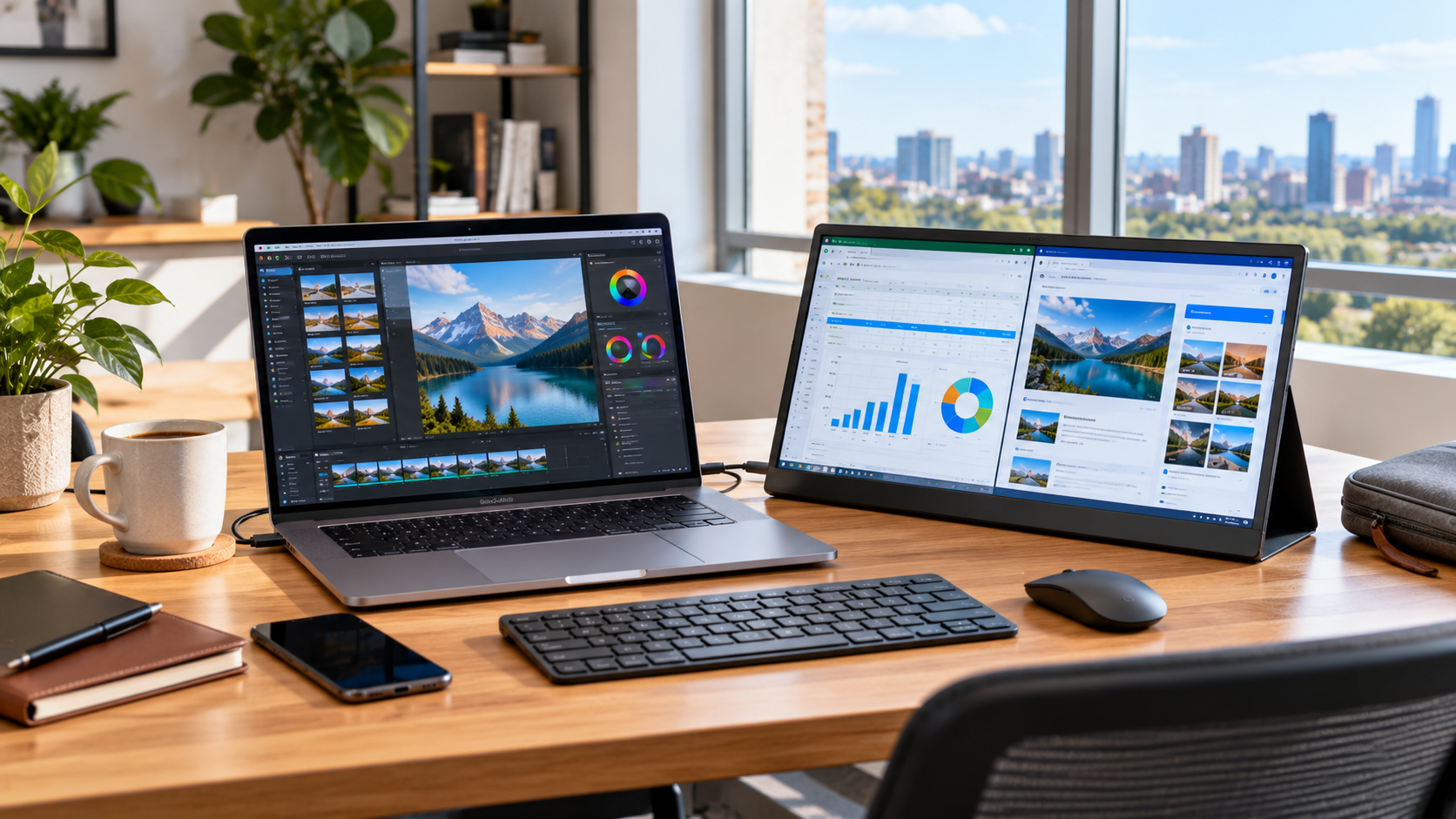
Portable Monitor: The Complete Guide to Choosing the Right Second Screen
A portable monitor gives laptop users, remote professionals, students, creators, gamers, and frequent travelers an additional display without requiring a permanent desktop setup. These slim external screens are designed to be easier to carry than traditional monitors while providing extra workspace for documents, communication tools, creative applications, presentations, entertainment, and other everyday tasks. Choosing the right model requires more than comparing screen size because resolution, ports, power requirements, panel quality, stand design, device compatibility, brightness, refresh rate, and intended use can all affect the experience.
Modern computing often involves working with several windows at the same time. A person may need a browser, spreadsheet, video meeting, research document, messaging platform, or editing application open simultaneously. A second screen can make those workflows easier to organize without constantly switching between windows.
Portable displays are also useful because they can move between locations. A single screen may be used in a home office, coworking space, hotel room, classroom, client meeting, or temporary workstation.
This guide explains how portable monitors work, the specifications that matter, common connection methods, practical use cases, and the factors buyers should evaluate before choosing one.
What Is a Portable Monitor?
A portable monitor is a compact external display designed to connect to a laptop, desktop computer, smartphone, tablet, gaming console, or another compatible device.
Unlike conventional desktop monitors, portable displays are generally designed around mobility. Their thinner construction, lower weight, compact stands, and simplified connections make them suitable for people who need an additional screen away from a permanent desk.
Many models connect through USB C, HDMI, or a combination of the two.
Some USB C connections can carry video, data, and power through one cable. However, this only works when both the source device and monitor support the necessary connection capabilities.
A USB C connector alone does not guarantee video output.
For example, a laptop may have a USB C port that supports charging or data but does not support video through DisplayPort Alternate Mode. Buyers should therefore check the specifications of both devices rather than assuming compatibility based only on the connector shape.
How Does a Portable Monitor Work?
A portable display receives a video signal from another device and displays it in much the same way as a standard monitor.
The exact setup depends on the available ports.
With a compatible USB C connection, one cable may be sufficient for video and power.
With HDMI, the video signal commonly travels through the HDMI cable while the monitor receives power through a separate USB connection or power adapter.
After connection, a computer operating system typically recognizes the screen as an external display.
Users can then choose how the screen behaves.
Common options include:
• Extending the desktop across both screens
• Duplicating the primary display
• Making the external screen the primary monitor
• Changing screen orientation
• Adjusting resolution and scaling
• Repositioning displays virtually to match the physical desk setup
Extending the desktop is particularly useful for productivity because it creates additional usable screen space.
9 Powerful Benefits of a Portable Monitor
The usefulness of an additional display depends on the user’s workflow, but portable screens offer several practical advantages.
1. Portable Monitor Productivity With More Screen Space
The most obvious advantage is additional workspace.
Instead of repeatedly minimizing and reopening applications, users can distribute their work across two displays.
For example, a writer can keep research on one screen while drafting on another. An accountant can view reference documents beside a spreadsheet. A developer can keep code on one display and documentation or testing tools on the second.
The benefit comes from organization rather than simply having a larger screen.
When related information remains visible, users may find it easier to compare content and maintain context while working.
2. Easier Remote Work Setup
Remote work does not always happen at a permanent home office.
Professionals may work from temporary offices, hotels, client locations, shared spaces, or other environments where traditional monitors are unavailable.
A compact second screen allows users to recreate part of a dual monitor workspace without transporting a full desktop display.
This can be especially useful for people whose regular workflow depends on multiple applications.
3. Better Multitasking
Multitasking often becomes frustrating on a small laptop screen because windows overlap.
A second display can separate different parts of a workflow.
For example:
• Video meeting on one screen and notes on another
• Email on one screen and a document on another
• Research on one screen and writing on another
• Editing tools on one screen and a preview on another
• Dashboard monitoring on one screen and operational work on another
This arrangement can reduce unnecessary window switching and create a cleaner workspace.
4. Useful for Business Presentations
Portable displays can also function as compact presentation screens.
A salesperson, consultant, designer, or field professional can position the display so a client sees information without needing to share the primary laptop screen directly.
This can be useful for showing proposals, product demonstrations, architectural concepts, dashboards, photographs, or other visual material.
Screen size still matters. Portable monitors are not replacements for large meeting room displays when several people need to view content from a distance.
They are better suited to small meetings and individual presentations.
5. Portable Monitor Convenience for Travel
Traditional monitors are difficult to transport because they are bulky and usually depend on large stands.
Portable displays are specifically designed to reduce these limitations.
Many can fit alongside a laptop in an appropriate carrying case or travel bag.
Frequent travelers should still consider weight carefully. A monitor, cables, charger, protective cover, laptop, and other accessories can add significant weight when combined.
Portability should therefore be evaluated as part of the entire travel setup rather than by considering the monitor alone.
6. Gaming on a Larger External Screen
Some portable monitors are designed with gaming in mind.
Depending on the model, features may include higher refresh rates, low response times, adaptive synchronization support, or connections suitable for consoles and gaming laptops.
Gamers should verify the resolution and refresh rate supported through each input.
A monitor advertised with a high refresh rate may require a particular port or cable configuration to reach its maximum specification.
Console compatibility should also be confirmed before purchasing.
7. Flexible Screen Orientation
Certain portable screens can be positioned vertically as well as horizontally.
Portrait orientation can be particularly useful for:
• Reading long documents
• Reviewing code
• Viewing webpages
• Monitoring communication applications
• Working with long spreadsheets
• Reading research material
Support for rotation can depend on the operating system, monitor design, stand, and software configuration.
Users planning to work vertically should make sure the included stand can safely support that orientation.
8. Useful for Creative Professionals
Photographers, video editors, designers, illustrators, and other creative professionals can use portable displays as secondary work surfaces.
One screen might hold the primary editing canvas while another displays file browsers, timelines, reference material, tool panels, or communication applications.
Color critical work requires additional attention.
Not every portable display is designed for professional color accuracy. Creative professionals should examine specifications such as color gamut coverage, calibration capabilities, panel consistency, brightness, and supported color modes.
Manufacturer supplied color claims should also be interpreted in the context of the user’s actual professional requirements.
9. Compact Alternative to a Permanent Dual Monitor Setup
Not everyone has enough desk space for two full sized desktop monitors.
A portable display can provide a second screen when needed and then be stored when the workspace needs to be cleared.
This makes it useful for small apartments, shared desks, temporary offices, student accommodation, and multipurpose rooms.
Portable Monitor Screen Size and Resolution
Screen size is one of the first specifications buyers notice, but larger is not automatically better.
A larger screen can improve visibility and workspace, but it also increases the physical footprint and can make the device less convenient to carry.
Common portable display sizes are broadly similar to laptop displays, although models exist outside the typical range.
Choose a size based on how the screen will actually be used.
Someone who travels every week may value compact dimensions more than a person who mainly moves the monitor between rooms.
Choosing Portable Monitor Resolution
Resolution determines how many pixels the display can show.
Full HD resolution is common and can provide a practical balance of image quality, hardware requirements, and cost for many portable screen sizes.
Higher resolution screens can display finer detail and may offer more usable workspace depending on scaling settings.
However, resolution should be considered alongside physical screen size.
A very high resolution on a relatively small display may require operating system scaling to keep text and interface elements comfortable to read.
Higher resolution may also require more graphics processing in demanding applications.
Portable Monitor Pixel Density Matters Too
Resolution alone does not describe how sharp a display appears.
Pixel density depends on both resolution and screen size.
The same resolution can appear sharper on a smaller screen because the pixels are packed more closely together.
For general productivity, buyers should prioritize comfortable text clarity and appropriate scaling rather than selecting the highest available resolution simply because the number is larger.
Understanding Portable Monitor Panel Types
Many portable displays use LCD panels, with IPS technology commonly selected for devices where viewing angles and consistent image reproduction are important.
Other panel technologies may also be available.
OLED portable monitors can provide deep blacks, high contrast, and strong visual impact because individual pixels can produce their own light.
However, panel technology affects price, brightness behavior, power consumption, longevity considerations, and overall use case.
No single panel type is best for every buyer.
Office users may prioritize text clarity and battery efficiency, while creative professionals may prioritize color performance and entertainment users may care more about contrast.
Portable Monitor Brightness and Outdoor Use
Brightness becomes particularly important when a screen is used in bright rooms or near windows.
A display that looks acceptable in a dim office may be more difficult to see under strong ambient light.
Outdoor use can be even more demanding because sunlight can overwhelm many consumer displays.
Screen coatings also affect visibility.
Glossy screens can produce stronger reflections, while matte finishes are designed to reduce reflections at the cost of a different visual appearance.
Anyone planning to use a portable display frequently in bright environments should compare brightness specifications and screen finish.
Portable Monitor USB C Compatibility
USB C is one of the most convenient connection options available for portable displays, but it is also a common source of confusion.
The physical USB C connector can support different features depending on the device.
A USB C port may support:
• Data only
• Charging
• Video output
• A combination of these functions
For direct video through USB C, the computer or mobile device must support an appropriate video output standard, commonly DisplayPort Alternate Mode or another compatible implementation.
Thunderbolt capable ports can also support display connections when the hardware and monitor are compatible.
Always check the laptop, tablet, smartphone, and monitor specifications before relying on a one cable setup.
HDMI Connections and Separate Power
HDMI remains useful because many computers, gaming consoles, cameras, and other devices support it.
A portable monitor with HDMI input can therefore work with a wider variety of equipment.
However, HDMI normally carries the video and audio signal rather than providing the monitor’s primary operating power.
The screen may need a separate USB power connection.
This means an HDMI setup may require two cables instead of one.
Buyers planning a highly mobile workstation should consider cable requirements when evaluating convenience.
Can a Smartphone Use a Portable Monitor?
Some smartphones can output video to an external display, but compatibility varies considerably.
Having a USB C connector does not automatically mean a phone can send video to a monitor.
The smartphone must support external display output through its hardware and software.
Some devices also offer desktop style interfaces when connected to a larger screen.
Others simply mirror the phone display.
Before buying a monitor primarily for smartphone use, verify external display support in the phone manufacturer’s specifications.
Portable Monitor Power Requirements
Power arrangements differ between models.
Some screens are powered directly through the connected computer. Others use a separate USB power source or adapter.
A small number of models include internal batteries, which can reduce dependence on the source device.
Bus powered monitors can be convenient, but drawing power from a laptop may reduce the laptop’s battery runtime.
This matters during travel or meetings where electrical outlets are unavailable.
Users should consider the combined power requirements of the laptop and external screen rather than looking only at monitor convenience.
Refresh Rate and Response Time
Refresh rate describes how frequently the screen updates the displayed image.
Standard productivity work does not usually require extremely high refresh rates.
Gaming and motion intensive applications can benefit more from higher refresh rates when the connected device can produce sufficient frames and the connection supports the required signal.
Response time also matters for motion clarity, particularly in gaming.
However, manufacturer response time measurements can use different test methods, so direct comparisons are not always straightforward.
Gamers should consider independent technical reviews alongside published specifications when motion performance is a major buying factor.
Touchscreen Portable Monitor Features
Some portable displays include touch input.
This can be useful for navigation, presentations, drawing, kiosks, control interfaces, or devices designed around touch interaction.
Touch functionality may require a separate USB data connection even when video is delivered through HDMI.
Operating system support also matters.
A touchscreen feature should therefore be treated as a compatibility requirement rather than simply an added specification.
Check whether touch gestures, stylus input, and other functions are supported by the intended device.
Built In Speakers and Audio
Some portable monitors include speakers.
These can be convenient for basic audio, presentations, video playback, or temporary workspaces.
Because thin displays have limited physical space for speaker hardware, users who prioritize audio quality may prefer headphones or separate speakers.
Gaming console users should also check how audio is routed through the monitor and whether an audio output connection is available if needed.
Portable Monitor Stand Design
The stand is one of the most overlooked parts of a portable screen.
A good display can become frustrating if the stand is unstable or provides an uncomfortable viewing angle.
Portable monitors may use:
• Folding protective covers
• Integrated kickstands
• Detachable stands
• Magnetic supports
• Tripod style accessories
Consider how the screen will be positioned on narrow tables, hotel desks, airplanes, temporary workspaces, and normal office surfaces.
A stable stand is especially important for touchscreen models because touching the display applies additional force.
How to Choose the Best Portable Monitor for Your Needs
The best choice depends on the intended workflow rather than one universal specification.
Before purchasing, identify the primary use.
For productivity, prioritize comfortable screen size, text clarity, reliable connections, and a stable stand.
For travel, prioritize weight, thickness, power requirements, protection, and cable simplicity.
For gaming, examine refresh rate, response behavior, supported resolutions, connection bandwidth, and device compatibility.
For creative work, pay closer attention to color performance, panel quality, calibration, brightness, and viewing consistency.
For presentations, consider viewing angles, stand flexibility, brightness, and connection compatibility.
Portable Monitor Buying Checklist
Before making a purchase, check the following:
• Screen size and physical dimensions
• Native resolution
• Panel technology
• Brightness
• Screen finish
• USB C video support
• HDMI availability
• Power requirements
• Included cables
• Supported refresh rate
• Stand stability
• Portrait mode capability
• Speaker availability
• Touch support if required
• Laptop compatibility
• Smartphone compatibility if needed
• Gaming console compatibility if required
• Weight and thickness
• Protective case or cover
• Warranty terms
A specification should matter because it supports the intended use. Paying for features that will never be used may provide little practical benefit.
Common Portable Monitor Setup Mistakes
One of the most common mistakes is assuming every USB C cable and port supports the same functions.
They do not.
Another issue is attempting to power a screen from a source that cannot provide sufficient power.
Users may also experience incorrect scaling, low refresh rates, unavailable resolutions, or unstable connections when cables and ports do not support the required bandwidth.
If a display does not work correctly, check:
• The source device’s video output specifications
• Monitor input requirements
• Cable capabilities
• Power source
• Operating system display settings
• Selected input source
• Manufacturer documentation
Testing with the supplied cables is often a sensible first troubleshooting step.
Is a Portable Monitor Worth Buying?
A portable display makes the most sense for users who regularly benefit from more than one screen but cannot rely on a permanent multi monitor workstation.
It can be especially practical for remote professionals, students, developers, financial workers, consultants, content creators, business travelers, and people with limited desk space.
It may provide less value for someone who rarely multitasks or already works exclusively at a desk with larger external monitors.
The decision should be based on actual workflow rather than the idea that more screens automatically improve productivity.
A well selected portable screen should solve a specific workspace problem.
Frequently Asked Questions
What is a portable monitor used for?
A portable monitor provides an additional external screen for laptops, phones, consoles, and other compatible devices, making it useful for productivity, travel, gaming, presentations, and creative work.
Can a portable monitor connect with one USB C cable?
Yes, some models can use one USB C cable for video and power, but the computer’s USB C port must support compatible video output and sufficient power delivery.
Does a portable monitor need external power?
Some models draw power from a connected laptop, while others require a separate USB power source or adapter. Certain portable monitors also include internal batteries.
Can I use a portable monitor with a gaming console?
Many portable monitors can work with gaming consoles through HDMI or another supported connection. Confirm compatible resolutions, refresh rates, power requirements, and audio options before buying.
Is Full HD enough for a portable monitor?
Full HD can be suitable for general productivity, travel, entertainment, and many other uses. Higher resolutions may provide additional detail but should be considered alongside screen size and scaling.
Can a portable monitor work with a smartphone?
It can if the smartphone supports external video output and the monitor supports a compatible connection. USB C alone does not guarantee that a phone can output video.
Conclusion
A portable monitor can turn a compact laptop setup into a more flexible workspace by providing extra screen space wherever compatible power and connectivity are available. The right choice depends on screen size, resolution, ports, power requirements, panel quality, stand design, portability, and the devices you intend to connect. Comparing these factors against your real workflow will help you choose a display that is practical for productivity, travel, creative work, presentations, or entertainment rather than paying for specifications you do not need.