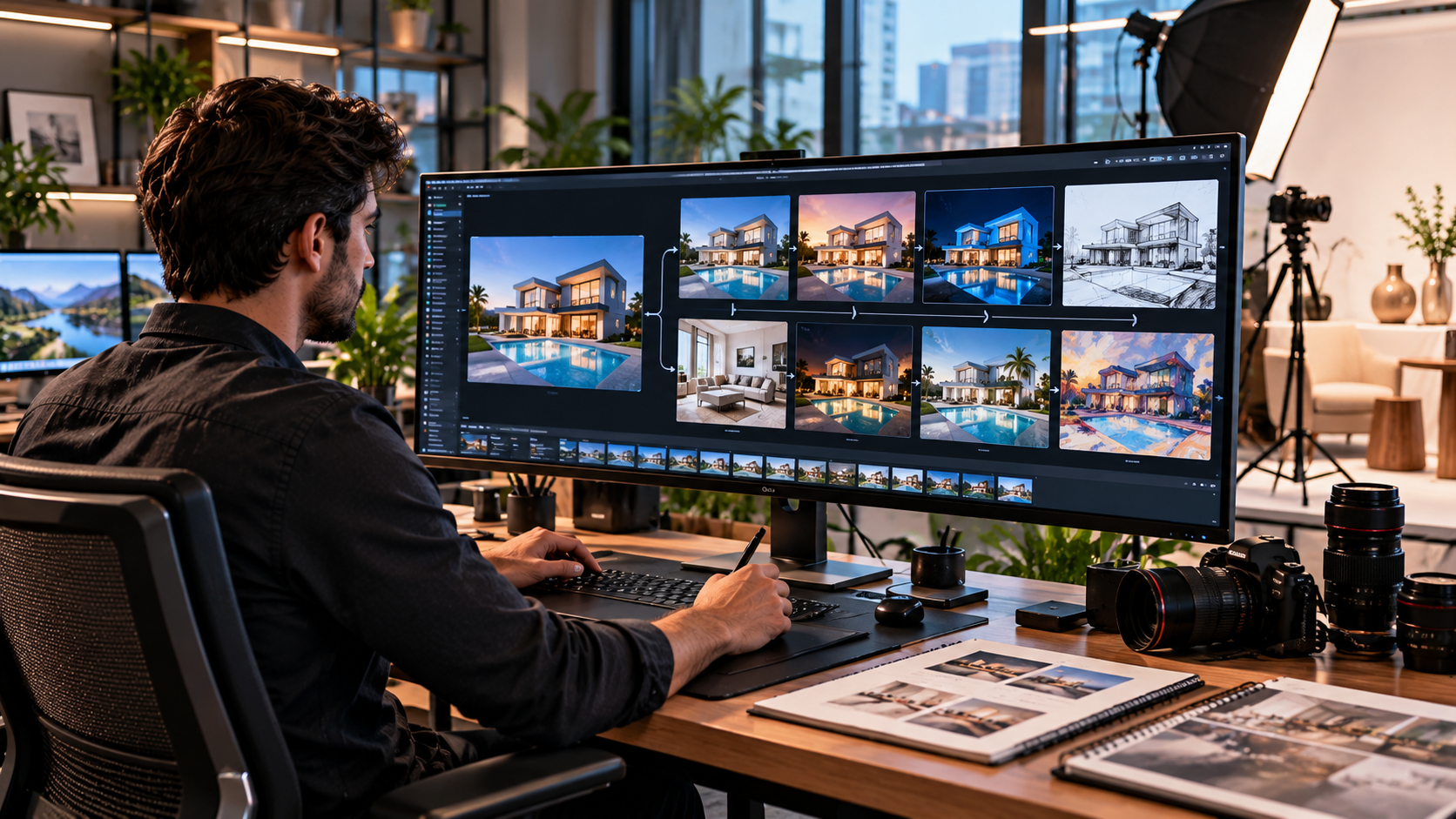
Image to Image AI for Smarter Editing, Creative Design, and Visual Transformation
Image to Image AI is changing how photographers, designers, marketers, ecommerce businesses, architects, content creators, and everyday users transform existing visual content. Instead of generating every image from an empty canvas, image to image technology begins with one or more source images and uses artificial intelligence to create a modified output while preserving selected elements of the original. Depending on the system and instructions, users can change backgrounds, adjust style, remove objects, extend scenes, improve lighting, redesign interiors, create product variations, alter materials, or produce entirely new interpretations based on an existing picture. Modern image editing systems can accept source images alongside written instructions, while some also support masks that limit editing to a selected region.
This workflow creates a useful middle ground between traditional photo editing and completely synthetic image generation.
Traditional editing gives precise manual control.
Text to image generation begins primarily from written instructions.
Image to image workflows combine visual references with generative control.
The source photograph can communicate composition, shape, perspective, subject identity, colour relationships, or layout more efficiently than a long written description.
The user then explains what should change and what should remain.
That combination makes the technology valuable for both creative experimentation and practical commercial editing.
What Is Image to Image AI?
Image to Image AI is an artificial intelligence workflow that accepts an existing image as input and generates a new or modified image based on the visual information in that source.
The new output may preserve:
• Composition
• Subject
• Pose
• Perspective
• Product shape
• Facial characteristics
• Lighting direction
• General colour palette
• Architectural structure
At the same time, the system may change:
• Style
• Background
• Clothing
• Materials
• Weather
• Colour
• Lighting
• Objects
• Texture
• Visual mood
The degree of transformation depends on the tool, model, prompt, and editing settings.
How Image to Image AI Differs From Text to Image
Text to image begins primarily from words.
For example:
A modern luxury kitchen with marble surfaces and warm evening light
The AI interprets that description and creates a scene.
Image to image adds a visual reference.
A user could upload an actual kitchen photograph and request a transformation into a luxury contemporary version while preserving the room structure.
This gives the AI much more visual context.
Image to Image AI Can Use Masks
Some modern editing systems allow users to select a specific area before requesting a change.
Adobe Firefly, for example, supports generative fill that lets users brush over an area and then add or replace content through text instructions. OpenAI image editing similarly supports masked editing for selected portions of an image.
This is useful when the user wants to change one element without redesigning the entire scene.
7 Amazing Uses of Image to Image AI
The technology can support many professional and creative workflows.
1. Image to Image AI Can Transform Backgrounds
Background replacement is one of the most practical applications.
A product photographed on a simple table can be transformed into a cleaner commercial scene.
A portrait can be moved from an ordinary wall to a professional studio style environment.
A furniture product can be placed inside a realistic room.
Possible uses include:
• Ecommerce
• Advertising
• Social media
• Real estate marketing
• Product catalogues
• Personal photography
• Event imagery
The strongest results usually preserve realistic lighting and perspective.
Image to Image AI Background Editing Needs Consistency
A new background should match the original subject.
Important details include:
• Light direction
• Shadow intensity
• Camera angle
• Depth of field
• Scale
• Colour temperature
If the subject was photographed under strong sunlight but the generated background appears softly lit indoors, the result may look artificial.
Human review remains important.
2. It Can Remove or Replace Unwanted Objects
Generative editing can reconstruct an area after an object is removed.
This may be useful for removing:
• Background people
• Furniture
• Small signs
• Cables
• Distracting objects
• Temporary equipment
• Visual clutter
The system analyses nearby information and generates replacement pixels.
This can be much faster than manually cloning complex textures.
However, accuracy varies.
Repeating patterns, reflections, hands, architectural details, and transparent surfaces can still produce mistakes.
3. Image to Image AI Can Create Style Variations
Style transformation is one of the most recognizable uses.
A source image can be interpreted in another visual direction while retaining important structural information.
Possible transformations include:
• Photorealistic to illustration
• Sketch to realistic rendering
• Daytime to evening atmosphere
• Minimal interior to luxury interior
• Modern design to vintage design
• Casual fashion to editorial styling
• Basic product photograph to premium advertising scene
This is especially useful during early creative development.
A designer can explore several directions before investing in final production.
4. Product Photography Can Be Expanded
Ecommerce businesses can use image transformation workflows to create additional product presentation ideas.
For example, a clean source photograph can inspire:
• Lifestyle settings
• Seasonal scenes
• Alternative backgrounds
• Advertising concepts
• Different crops
• Social media visuals
The product itself should remain accurate.
AI should not create false features, colours, sizes, or accessories that customers will not receive.
5. Architects and Interior Designers Can Visualize Ideas
Architecture and interior design are natural applications.
A photograph of an existing room can be transformed to explore different:
• Furniture
• Materials
• Flooring
• Wall colours
• Lighting
• Cabinet styles
• Decorative elements
• Design themes
A client could see several conceptual directions before physical renovation begins.
These images should be presented as visual concepts rather than guaranteed representations of final construction.
Real projects still require accurate measurements, professional plans, materials, budgets, and engineering where applicable.
6. Marketing Teams Can Create Campaign Variations
A single approved photograph can become the basis for multiple campaign concepts.
Marketing teams may experiment with:
• Seasonal styling
• Different settings
• Alternative compositions
• Additional empty space for layout
• Different lighting moods
• Product environments
This can make creative testing faster.
The original visual identity can remain recognizable while the surrounding context changes.
7. Existing Images Can Be Enhanced or Restored
AI can assist with improving old or imperfect images.
Possible tasks include:
• Noise reduction
• Sharpening
• Colour restoration
• Scratch removal
• Resolution enhancement
• Contrast improvement
• Damage repair
• Background cleanup
The system may reconstruct missing visual information.
This means restoration is not always historically exact.
When authenticity matters, the original file should always be preserved separately.
How Image to Image AI Works
The technical implementation varies between models, but the basic concept is straightforward.
The system receives visual information from an image.
It analyses features such as:
• Shapes
• Edges
• Objects
• Colours
• Textures
• Spatial relationships
• Lighting
• Subject identity
The user’s prompt adds instructions.
For example:
Keep the building structure unchanged but replace the landscaping with a modern minimalist garden and change the scene to soft evening light.
The model then creates a new image influenced by both inputs.
Current image generation systems can also use multiple reference images in some workflows, allowing information from several visual sources to guide one result.
Writing Better Image to Image AI Prompts
Prompts should clearly separate what needs to change from what must remain.
A useful structure includes:
• Main subject
• Elements to preserve
• Elements to change
• Desired style
• Lighting
• Composition
• Quality requirements
• Restrictions
Example Prompt Structure
Instead of:
Make this better
Use:
Keep the original furniture shape and camera position unchanged. Replace the plain background with a premium contemporary living room, add warm natural window light, preserve realistic shadows and product colours, and maintain professional commercial photography.
Specific instructions reduce ambiguity.
Describe Preservation Clearly
If something is important, state it.
Examples include:
• Keep the person’s face unchanged
• Preserve the original product shape
• Maintain the camera angle
• Keep the architecture identical
• Preserve the logo placement
• Do not alter the garment colour
Current prompting guidance for image editing similarly recommends identifying both what should change and what should stay the same, followed by iterative refinement.
Image to Image AI for Ecommerce
Online retailers depend heavily on visual presentation.
AI editing can help create consistent product imagery more efficiently.
Clean Product Backgrounds
Different suppliers may provide photographs with inconsistent environments.
Image transformation can help create a more consistent visual catalogue.
Lifestyle Product Images
A plain product image can be used as a reference for conceptual lifestyle scenes.
For example:
A lamp can appear inside a contemporary bedroom.
A chair can be placed in a modern office.
A kitchen product can appear on a realistic countertop.
Preserve Product Accuracy
This is critical.
AI should not accidentally change:
• Number of buttons
• Product dimensions
• Colour
• Materials
• Packaging
• Accessories
• Labels
Images used for sales should represent the real product.
Image to Image AI for Fashion
Fashion businesses can use reference based visual generation for:
• Campaign concepts
• Background styling
• Editorial scenes
• Colour exploration
• Social content
• Mood boards
Care is needed when editing clothing.
An AI generated image may alter:
• Seams
• Fabric texture
• Fit
• Pockets
• Buttons
• Logos
• Patterns
If the image represents a real product for sale, these details should remain accurate.
Image to Image AI for Real Estate
Real estate photography can benefit from careful visual cleanup.
Potential uses include:
• Removing temporary clutter
• Improving lighting
• Enhancing landscaping
• Creating renovation concepts
• Virtual staging
• Visualizing empty rooms
However, editing should not mislead buyers.
Removing permanent defects, changing actual room size, hiding structural issues, or creating nonexistent features can misrepresent a property.
Concept images should be clearly distinguished from documentary photographs where necessary.
Image to Image AI for Interior Design
Interior designers can turn existing room photographs into concept studies.
A single room can be explored as:
• Minimalist
• Contemporary
• Scandinavian
• Industrial
• Luxury
• Traditional
• Japandi
• Mediterranean
This allows clients to evaluate broad visual directions quickly.
Keep Architecture Stable
If the goal is interior styling, prompts should specify that walls, windows, doors, and room dimensions should remain unchanged.
Otherwise, the AI may redesign the architecture itself.
Image to Image AI for Marketing Agencies
Agencies frequently need many visual versions for campaigns.
A reference based workflow can help develop:
• Website hero images
• Social posts
• Advertising concepts
• Email graphics
• Seasonal visuals
• Campaign mockups
• Blog images
The technology is particularly useful during ideation because teams can test more directions before committing to final creative production.
Image to Image AI and Brand Consistency
Generative systems can produce visually impressive outputs while still drifting away from brand standards.
Organizations should define:
• Brand colours
• Photography style
• Product appearance
• Typography rules
• Approved environments
• Logo usage
• Visual tone
Reference images can help maintain consistency.
Final outputs should still be reviewed against brand guidelines.
Multi Image Reference Workflows
Some modern image systems can accept more than one visual reference.
This creates new creative possibilities.
A workflow might combine:
• Product photograph
• Interior reference
• Lighting reference
• Material reference
The model can then create a unified result influenced by several inputs.
Modern image editing APIs now support multiple source images for reference based generation and editing.
This can be useful for complex commercial workflows.
Image to Image AI and Image Quality
A good input improves the chances of a good output.
Source images should ideally have:
• Clear subject detail
• Good resolution
• Appropriate lighting
• Accurate colour
• Sharp focus
• Minimal compression
AI can improve poor imagery to some extent, but it cannot reliably recreate every detail that never existed in the original file.
Inspect Fine Details
Always check:
• Hands
• Faces
• Text
• Logos
• Reflections
• Jewellery
• Architecture
• Product edges
• Repeating patterns
These areas can expose generative errors.
Image to Image AI and Privacy
Uploading an image to an online AI service may involve processing it through external infrastructure.
This creates privacy considerations.
Be especially careful with:
• Customer photographs
• Medical images
• Children
• Employee records
• Identity documents
• Confidential products
• Unreleased campaigns
• Private property information
Before using sensitive images, review the service’s:
• Privacy policy
• Data retention policy
• Training policy
• Security controls
• Business terms
Organizations with strict confidentiality requirements may need enterprise arrangements or locally controlled workflows.
Copyright and Image to Image AI
Using AI does not automatically grant permission to modify or publish someone else’s copyrighted image.
Users should consider whether they have rights to:
• Source photographs
• Illustrations
• Artwork
• Logos
• Characters
• Product images
• Celebrity photographs
• Brand materials
Commercial users should be especially careful.
A transformation can still raise intellectual property issues depending on the source and final use.
Ethical Use of Image to Image AI
Visual transformation can create highly realistic content.
That power should be used responsibly.
Extra care is appropriate for:
• News
• Elections
• Medical evidence
• Legal evidence
• Identity documents
• Scientific records
• Product advertising
• Property listings
• Financial documents
Creative experimentation and factual documentation are different use cases.
A fictional advertising concept can allow extensive transformation.
An image presented as evidence should maintain factual integrity.
Common Image to Image AI Mistakes
Using a Weak Source Image
Very low resolution or heavily compressed input can limit quality.
Writing Vague Prompts
Unclear instructions give the model more freedom to alter important details.
Changing Too Much at Once
Large transformations make it harder to identify why something went wrong.
Ignoring Product Accuracy
Commercial product images must remain faithful to the real item.
Failing to Inspect Faces and Hands
Small anomalies can make an otherwise realistic image appear artificial.
Forgetting Lighting Consistency
Generated objects need shadows and light matching the scene.
Publishing the First Output
Several iterations may be required.
Deleting the Original
Always keep an untouched source file.
Building a Better Image to Image AI Workflow
A reliable workflow can follow several steps.
Step One: Choose the Best Source
Start with the clearest available image.
Step Two: Define the Objective
Decide exactly what the edit should achieve.
Step Three: Identify Elements to Preserve
List subjects, objects, composition, colours, or details that should remain unchanged.
Step Four: Describe the Transformation
Explain the new style, environment, lighting, material, or object.
Step Five: Generate a Controlled Variation
Avoid making unnecessary changes.
Step Six: Review at Full Resolution
Inspect small details carefully.
Step Seven: Refine One Problem at a Time
If the image is almost correct, ask for a targeted change rather than generating an entirely different result.
Step Eight: Export for the Intended Use
Prepare the final file for:
• Website
• Social media
• Advertising
• Ecommerce
• Presentation
Different uses may require different dimensions and compression.
Future of Image to Image AI
Image transformation is becoming increasingly conversational.
Users no longer need to describe every edit using technical software controls.
Instead, they can increasingly communicate visually and verbally.
Future workflows are likely to improve:
• Subject preservation
• Character consistency
• Product accuracy
• Material realism
• Typography
• Multi image references
• Lighting consistency
• Iterative editing
• Video integration
• Creative automation
The role of the human creator will remain important.
AI can generate possibilities quickly, but people still determine which result is accurate, ethical, useful, and visually appropriate.
Frequently Asked Questions
What is Image to Image AI?
Image to Image AI uses an existing image as visual input and generates a modified or transformed version based on prompts, references, masks, or other editing instructions.
How is Image to Image AI different from text to image?
Text to image creates visuals mainly from written prompts, while Image to Image AI also uses an existing image to guide composition, subjects, style, or other visual details.
Can Image to Image AI change only part of a photo?
Yes. Some AI editing tools support masks or selection based generative editing that allows a specific area to be changed while preserving the rest of the image.
Is Image to Image AI useful for ecommerce?
Yes. It can help create cleaner backgrounds, lifestyle concepts, additional campaign visuals, and consistent catalogue presentation when the real product remains accurately represented.
Can Image to Image AI improve old photographs?
It can assist with scratches, noise, sharpness, colour, and missing areas, but generated restoration details may be interpretations rather than historically exact information.
Is Image to Image AI safe for commercial use?
It can support commercial workflows, but businesses should review image rights, privacy, tool licensing terms, factual accuracy, brand standards, and any applicable legal requirements before publication.
Conclusion
Image to Image AI provides a flexible way to transform existing visuals while preserving important elements of the original scene. It can support product photography, marketing, architecture, interior design, fashion, restoration, advertising, and everyday creative editing through reference based generation and targeted changes. The strongest results come from high quality source images, precise prompts, careful preservation instructions, and detailed human review. Used responsibly, the technology can accelerate creative production without replacing the judgement needed to maintain accuracy, authenticity, and professional quality.