What Is ZTNA for Secure Remote Access? How Zero Trust Access Protects Modern Workforces
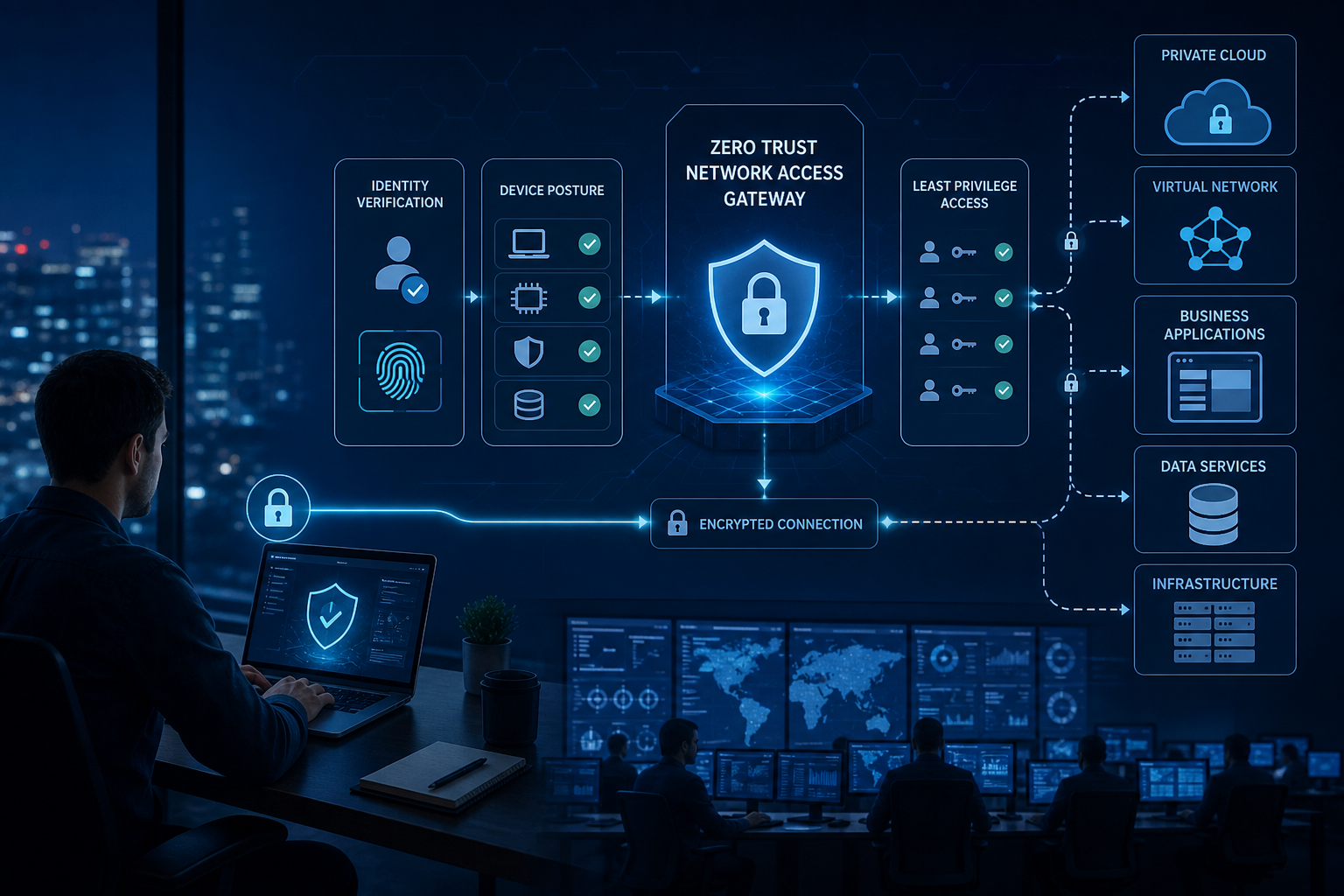
Understanding what is ZTNA for secure remote access starts with a simple principle: a user or device should not receive broad network access merely because it successfully connects from a particular location. Zero Trust Network Access, commonly abbreviated as ZTNA, uses identity, device context, policy, and other signals to grant controlled access to specific applications or resources. Unlike traditional remote access designs that can place authenticated users onto a wider private network, ZTNA is generally designed around least privilege, application level access, and repeated policy enforcement.
What Is ZTNA for Secure Remote Access?
Zero Trust Network Access is a security approach and technology category used to provide authorized users with controlled access to private applications and resources without automatically exposing a broader internal network.
In a typical ZTNA design, access is based on policy.
Before a user receives access to a protected application, the system can evaluate factors such as identity, authentication status, device posture, requested application, location, risk signals, and organizational policy.
If the request satisfies the applicable policy, the system establishes access to the authorized resource.
Access to one application does not necessarily provide access to unrelated internal systems.
This approach is closely associated with zero trust architecture, which rejects the assumption that a network location should automatically be considered trustworthy.
The U.S. National Institute of Standards and Technology describes zero trust as an approach that shifts security away from static, network based perimeters toward users, assets, and resources.
Why ZTNA Matters for Secure Remote Access
Traditional enterprise security was often designed around centralized offices and private corporate networks.
Users worked from managed buildings, applications ran in company data centers, and security controls concentrated heavily on the network perimeter.
Modern IT environments are different.
Employees may work from homes, hotels, customer sites, airports, branch offices, or coworking spaces. Applications may exist in private data centers, infrastructure as a service environments, public cloud platforms, and software as a service products.
The location of the user is therefore a weak basis for determining trust.
ZTNA focuses instead on whether the specific access request meets security requirements.
9 Key Benefits of ZTNA for Secure Remote Access
ZTNA does not eliminate cybersecurity risk. Correctly designed deployments can, however, reduce some of the weaknesses associated with overly broad remote network access.
1. Least Privilege Application Access
Least privilege means providing only the access required for a legitimate task.
A finance employee, for example, may need access to a particular accounting application but have no business need to reach engineering systems.
ZTNA policies can reflect these distinctions.
Users can receive access according to identity, role, group, device status, and other approved conditions.
This limits unnecessary exposure.
2. Reduced Internal Network Exposure
Traditional remote access can, depending on configuration, make portions of the internal network reachable after a user establishes a connection.
ZTNA commonly takes an application centric approach.
A user can be connected to an approved resource without being given broad visibility into the underlying network.
How ZTNA for Secure Remote Access Reduces Attack Surface
The security objective is to expose fewer resources to each connection.
Instead of allowing a remote endpoint to discover large portions of the private environment, ZTNA can restrict communication to explicitly approved applications.
The effectiveness of this protection depends on architecture and policy configuration.
Poorly configured zero trust products can still create excessive access.
3. Identity Driven Security
ZTNA commonly integrates with organizational identity systems.
This allows access decisions to incorporate verified user identity.
Identity providers can support controls such as:
• Single sign on
• Multifactor authentication
• User groups
• Conditional access
• Account lifecycle management
• Authentication policies
Identity alone is not enough, but it provides a crucial foundation.
4. Device Posture Checks
A legitimate employee using an unmanaged or compromised device can still create risk.
ZTNA products may evaluate device conditions before granting access.
Depending on technology and organizational policy, posture checks may examine operating system status, endpoint protection, encryption, certificates, management enrollment, or other security signals.
5. More Granular Access Policies
A zero trust access policy can consider more than username and password.
Organizations may apply conditions involving:
• User identity
• Role
• Device
• Application
• Authentication strength
• Geographic information
• Risk signals
• Time
• Endpoint health
The exact policy capabilities depend on the ZTNA platform and surrounding security architecture.
6. Improved Support for Hybrid Work
ZTNA is well suited to environments in which legitimate users regularly connect from outside company offices.
Access policy can follow the user’s identity and device rather than depending primarily on the physical office network.
This can provide more consistent controls for distributed workforces.
7. Better Segmentation of Third Party Access
Contractors, suppliers, consultants, and partners may need access to one business application without needing general network connectivity.
ZTNA can provide narrowly scoped access.
This is particularly useful for reducing unnecessary third party exposure.
8. Contextual Access Decisions
Some ZTNA systems can reconsider access when security context changes.
An authenticated session should not necessarily be trusted indefinitely.
Risk signals can potentially trigger additional authentication, reduced access, or session termination according to policy.
9. More Detailed Access Visibility
ZTNA platforms can generate logs about who requested access, which application was involved, and how policy decisions were made.
These records can support security monitoring and investigations.
ZTNA Logging for Secure Remote Access
Organizations should determine which events are logged and how logs integrate with:
• Security information and event management systems
• Identity platforms
• Endpoint security
• Incident response processes
• Compliance monitoring
• User and entity behavior analytics
Collecting logs alone provides limited value unless somebody monitors and uses them effectively.
How ZTNA Works
ZTNA implementations differ by vendor, but the general workflow can be understood through several stages.
Step 1: User Requests an Application
A remote employee attempts to access a private business application.
The user does not automatically receive general network connectivity.
The request is directed through the organization’s access architecture.
Step 2: Identity Is Verified
The system integrates with an identity provider to determine who is making the request.
Multifactor authentication may be required.
Authentication strength can be adjusted according to risk and application sensitivity.
Step 3: Device Context Is Evaluated
The system may determine whether the device satisfies organizational requirements.
An unmanaged personal laptop might receive different access from an organization managed device.
Step 4: Policy Is Evaluated
The policy engine compares the request against access rules.
ZTNA for Secure Remote Access Policy Example
A policy might effectively state that:
A member of the finance group may access the payroll application from a managed, encrypted company device after strong authentication, provided relevant security conditions are satisfied.
The user still receives no automatic authorization for engineering or administrative systems.
Step 5: Application Access Is Established
If policy requirements are met, an authorized connection is created to the intended resource.
The implementation may use connectors, proxies, gateways, tunnels, or other mechanisms depending on architecture.
Step 6: Activity Is Monitored
Security controls can log access and potentially reevaluate the session based on changes in context.
This provides a more dynamic model than simply trusting the connection indefinitely after initial login.
What Is Zero Trust?
Zero trust is broader than ZTNA.
ZTNA is one technology approach that can contribute to a zero trust architecture.
NIST Special Publication 800 207 provides a widely referenced framework for understanding Zero Trust Architecture.
Its principles emphasize protecting resources rather than assuming that everything inside a traditional network boundary deserves trust.
Never Trust, Always Verify?
The popular phrase “never trust, always verify” summarizes part of the concept but oversimplifies real architecture.
Zero trust does not mean every request is treated as malicious.
It means trust should not be implicitly granted based primarily on network location.
Access decisions should be explicitly evaluated against policy.
Zero Trust Is Not a Single Product
A company cannot become zero trust merely by purchasing software labeled Zero Trust.
A broader program can involve:
• Identity management
• Multifactor authentication
• Device security
• Application security
• Data protection
• Network controls
• Monitoring
• Least privilege
• Governance
• Incident response
ZTNA for Secure Remote Access Within Zero Trust
ZTNA specifically addresses access to resources.
It does not replace endpoint protection, vulnerability management, data loss prevention, security monitoring, backups, or other cybersecurity controls.
It should be integrated into a broader security program.
ZTNA vs VPN for Secure Remote Access
The comparison between ZTNA and virtual private networks is one of the most common questions in remote access security.
Both can protect remote connections, but their access models often differ.
How Traditional Remote Access VPN Works
A remote access VPN generally creates an encrypted tunnel between a user’s endpoint and a VPN gateway connected to an organizational network.
After authentication, the device can receive access according to network routing and firewall rules.
A well designed VPN can restrict access significantly.
Therefore, it is inaccurate to claim that every VPN automatically gives every user unrestricted access to the entire corporate network.
How ZTNA Differs
ZTNA commonly focuses on connecting an authorized identity to a specific application rather than connecting an endpoint broadly to a network.
This can reduce the amount of network exposure required for remote work.
ZTNA for Secure Remote Access vs VPN
Major conceptual differences include:
• VPN commonly emphasizes network connectivity
• ZTNA generally emphasizes application or resource access
• ZTNA commonly incorporates identity and contextual policy deeply
• VPN access can also be segmented when properly designed
• Both approaches can use encryption
• Both require secure identity and endpoint controls
ZTNA should not be marketed as automatically secure while VPN is automatically insecure.
Architecture and implementation determine real risk.
Does ZTNA Replace a VPN?
Sometimes, but not universally.
Organizations may replace remote access VPN for specific applications while retaining VPN technology for other use cases.
Where ZTNA Can Replace Remote Access VPN
ZTNA can be well suited to browser based and compatible private applications where application level access is practical.
It can also work well for contractors who need limited access.
Where VPN May Remain Necessary
Some legacy applications, administrative workflows, unusual protocols, network management tasks, or infrastructure may require network level connectivity that a particular ZTNA platform cannot provide.
Hybrid ZTNA and VPN Architecture
During migration, organizations often operate both technologies.
The goal can be to move suitable applications toward granular zero trust access while retaining controlled VPN connectivity for remaining requirements.
Migration should be based on application testing rather than policy fashion.
Agent Based ZTNA
Some ZTNA architectures require software on the user’s device.
This agent can provide device identity, posture information, routing, and secure connectivity.
Advantages of Agent Based ZTNA
Potential benefits include:
• Detailed endpoint context
• Support for nonbrowser applications
• Device certificates
• Managed routing
• Continuous posture information
Capabilities differ between products.
Limitations
Agents need deployment, updates, compatibility testing, and endpoint management.
Contractor devices can create additional challenges.
Agentless ZTNA
Agentless access commonly uses browser based methods or other approaches that do not require a dedicated endpoint agent for certain applications.
Benefits
This can simplify access for partners, contractors, or unmanaged devices in appropriate use cases.
Limitations
Agentless approaches may have less endpoint visibility and can be limited in the types of applications they support.
Choosing a ZTNA for Secure Remote Access Architecture
Organizations often need both approaches.
The correct choice depends on:
• Application protocols
• Device ownership
• Employee roles
• Contractor requirements
• Security requirements
• User experience
• Endpoint management
Pilot testing is essential.
Identity and ZTNA
Identity is central to modern access control.
Multifactor Authentication
MFA requires more than one factor or method of authentication.
Not all MFA methods provide identical resistance to phishing and account takeover.
For sensitive systems, organizations may consider phishing resistant authentication approaches where appropriate.
Single Sign On
SSO can simplify access by allowing users to authenticate through a centralized identity platform.
Centralization can improve governance but also makes identity infrastructure particularly important to protect.
Account Lifecycle
Access should change when a user’s role changes and end promptly when employment or a contract ends.
ZTNA for Secure Remote Access and Identity Governance
ZTNA policies should connect with authoritative identity and role information.
Dormant accounts and excessive group memberships can undermine least privilege even if the access platform itself works correctly.
Device Trust and Posture
A valid password does not establish that a device is safe.
Managed vs Unmanaged Devices
Organizations may permit different levels of access depending on whether an endpoint is controlled by corporate device management.
A personally owned device might receive browser only access to limited applications.
Endpoint Security Signals
Posture can include:
• Operating system version
• Security updates
• Disk encryption
• Endpoint protection
• Device certificate
• Management status
• Firewall state
Limits of ZTNA Device Posture Checks
Posture checks reduce risk but cannot prove an endpoint is uncompromised.
Attackers can use stolen sessions, legitimate tools, application vulnerabilities, or other techniques.
Endpoint detection and response and broader monitoring remain important.
Least Privilege Access With ZTNA
Least privilege is one of the strongest reasons organizations consider ZTNA.
Role Based Policies
Access can be assigned based on job function.
Finance, human resources, engineering, and sales users do not necessarily need access to the same private applications.
Attribute Based Decisions
Policies can incorporate additional contextual attributes beyond roles.
Just in Time Access
Some organizations combine zero trust access with privileged access management to provide temporary administrative permissions.
ZTNA for Secure Remote Access and Privileged Users
Administrative access deserves additional controls.
Consider stronger authentication, dedicated devices, session monitoring, limited duration privileges, and specialized privileged access tools where risk warrants them.
ZTNA alone does not solve privileged account security.
ZTNA for Third Party and Contractor Access
External access has historically been challenging because third parties may need business resources without becoming full members of the internal environment.
Restrict Contractors to Required Applications
A contractor working with one development environment may only need that resource.
Avoid granting network access simply because it is operationally convenient.
Time Limit Accounts
Contractor access should have an expiry aligned with the engagement.
ZTNA Third Party Security
Apply security requirements based on risk.
These can include MFA, device requirements, restricted download capabilities, approved working hours, and monitoring where appropriate and lawful.
ZTNA for Cloud Applications
Enterprises frequently operate applications across several cloud environments.
ZTNA can provide a consistent access layer for private applications hosted across different locations.
Multi Cloud Environments
Applications may live in:
• Private data centers
• AWS
• Microsoft Azure
• Google Cloud
• Private cloud environments
• Colocation facilities
ZTNA connectors can potentially provide access without exposing applications publicly, depending on architecture.
SaaS Is Different
Software as a service applications are already typically internet accessible.
SaaS security often relies heavily on identity controls, conditional access, application configuration, and security service technologies.
ZTNA for Secure Remote Access to Private Cloud Apps
ZTNA is particularly relevant where an application should remain private but needs to be accessible by distributed users.
The architecture can remove the need to expose the application’s network broadly to remote endpoints.
ZTNA and Network Segmentation
Segmentation limits how freely systems can communicate.
ZTNA contributes to segmentation from an access perspective by restricting user connectivity to authorized resources.
It does not necessarily replace internal network segmentation.
East West Traffic
After compromising an application or workload, attackers may attempt lateral movement between systems.
Microsegmentation and workload security can address these paths more directly.
ZTNA for Secure Remote Access Is Not Microsegmentation
The concepts overlap in zero trust strategies but solve different parts of the problem.
ZTNA primarily governs user or device access to applications, while microsegmentation can control communication between workloads.
ZTNA Security Architecture
A simplified ZTNA architecture commonly includes several functional elements.
Policy Decision Point
A policy component decides whether access should be authorized based on relevant information.
Enforcement Point
An enforcement component allows, blocks, or terminates access according to the policy decision.
Application Connector
Some platforms place outbound connecting software near protected applications.
This can eliminate the need for certain inbound exposure depending on design.
Secure ZTNA Architecture Principles
Strong architecture generally benefits from:
• High availability
• Protected identity systems
• Secure connectors
• Reliable logging
• Minimal privileges
• Segmented management
• Resilient DNS
• Strong certificate management
• Incident response integration
A failed access platform can become a business availability problem, making resilience important.
ZTNA and SASE
Secure Access Service Edge, or SASE, is an architectural concept combining networking and security capabilities delivered in a cloud oriented model.
ZTNA is commonly included as one capability within SASE offerings.
Other components can include secure web gateways, cloud access security controls, firewall capabilities, and software defined WAN functionality depending on platform and interpretation.
SSE and ZTNA
Security Service Edge, commonly abbreviated SSE, focuses on cloud delivered security functions without necessarily including the WAN networking component associated with SASE.
ZTNA is often part of SSE platforms.
Does a Business Need SASE to Use ZTNA?
No.
An organization can deploy ZTNA without adopting a complete SASE architecture.
Choose architecture based on actual security and networking requirements rather than terminology.
ZTNA Security Risks and Limitations
ZTNA improves access control but introduces dependencies of its own.
Identity Compromise
If attackers compromise a legitimate identity and satisfy required controls, they may receive whatever access that identity is permitted.
Strong identity security remains essential.
Misconfigured Policies
Overly broad policies can recreate excessive access under a different technology.
Provider Availability
Cloud delivered ZTNA creates dependency on provider infrastructure and internet connectivity.
Application Compatibility
Legacy applications can complicate implementation.
ZTNA Does Not Eliminate Cybersecurity Risk
Organizations still need:
• Endpoint security
• Patch management
• Secure application development
• Vulnerability management
• Identity protection
• Backups
• Security monitoring
• Incident response
• Data protection
• User education
Zero trust access is one security layer.
How to Implement ZTNA for Secure Remote Access
A successful rollout usually works better as a phased program than a sudden replacement of every remote access system.
1. Inventory Applications
Identify private applications and the users who need them.
Document protocols and dependencies.
2. Map Existing Access
Understand who currently has access and why.
Legacy permissions often contain unnecessary privileges.
3. Strengthen Identity
Integrate an appropriate identity provider and MFA.
Clean up inactive accounts and groups.
4. Define Device Requirements
Decide what constitutes an acceptable device for different application categories.
5. Create Least Privilege Policies
Start with actual business requirements.
ZTNA for Secure Remote Access Pilot Deployment
Pilot with:
• A limited user group
• Several representative applications
• Managed endpoints
• Remote employees
• IT support participation
Measure authentication reliability, application performance, user experience, security logs, and support issues before wider deployment.
6. Expand Gradually
Move additional applications and groups after addressing pilot issues.
7. Monitor and Refine
Access requirements change as organizations evolve.
Review policies rather than treating deployment as a one time project.
ZTNA Policy Best Practices
Policy design should balance security with usability.
Default Deny
Resources should be unavailable unless policy explicitly authorizes them.
Use Groups Carefully
Avoid creating enormous groups that grant unrelated applications simply for administrative convenience.
Require Stronger Controls for Sensitive Applications
Not every resource carries identical risk.
Reviewing ZTNA for Secure Remote Access Policies
Periodically examine:
• Inactive users
• Old contractor accounts
• Unused applications
• Excessive groups
• Policy exceptions
• Unmanaged device access
• Authentication failures
• Unusual locations
• Privileged access
Access reviews help prevent permission accumulation over time.
Choosing a ZTNA Provider
Product comparisons should reflect technical requirements rather than analyst terminology alone.
Application Support
Confirm that the platform supports your application protocols.
Identity Integration
Check compatibility with existing identity providers and authentication methods.
Device Integration
Evaluate endpoint management, EDR, certificates, and posture capabilities.
Global Performance
Distributed organizations should investigate provider points of presence and routing.
ZTNA Provider Evaluation Checklist
Compare:
• Application compatibility
• Identity integrations
• Device posture
• Agent requirements
• Agentless capability
• MFA support
• Logging
• SIEM integrations
• API support
• High availability
• Geographic coverage
• Performance
• Support
• Data handling
• Pricing
• Contract terms
Conduct a proof of concept with actual applications before committing broadly.
ZTNA Costs
ZTNA pricing depends on provider and architecture.
Common factors can include number of users, applications, bandwidth, features, support level, and additional security services.
Look Beyond Licensing
Total cost can include:
• Software subscriptions
• Deployment
• Identity upgrades
• Endpoint management
• Integrations
• Training
• Migration
• Support
• Operations
Compare With Existing Remote Access Cost
VPN infrastructure also carries costs involving appliances, licenses, maintenance, capacity, and administration.
Calculating ZTNA Business Value
Potential value can come from reduced infrastructure complexity, narrower access, easier third party access, and improved remote work experience.
Claims should be measured within the actual organization rather than relying on vendor ROI guarantees.
ZTNA for Small Businesses
ZTNA is not limited to global enterprises.
Small businesses increasingly rely on cloud infrastructure and remote employees.
A cloud managed ZTNA service can provide granular access without requiring large VPN gateway deployments in certain environments.
However, small businesses should establish fundamental security controls first.
Strong MFA, managed endpoints, backups, updates, and account security remain essential.
ZTNA Compliance Considerations
ZTNA can support access control and logging requirements within broader compliance programs.
It does not make an organization compliant automatically.
Compliance depends on the specific standard, regulation, implementation, policies, processes, evidence, and organizational scope.
Audit Logs
Access records can help demonstrate who connected to protected systems.
Retention requirements depend on organizational and regulatory needs.
Access Reviews
Periodic review can support governance.
ZTNA and Regulatory Requirements
Organizations handling regulated information should involve security, legal, privacy, risk, and compliance professionals when designing access architecture.
Technology should support requirements rather than being treated as certification by itself.
Common ZTNA Implementation Mistakes
Buying a ZTNA platform without understanding applications can create operational problems.
Avoid:
• Treating ZTNA as a single product solution to zero trust
• Migrating every application simultaneously
• Ignoring legacy protocols
• Keeping excessively broad groups
• Weak MFA
• Ignoring endpoint security
• Failing to plan for outages
• Collecting logs without monitoring them
• Leaving contractor accounts active indefinitely
• Creating permanent policy exceptions
• Assuming ZTNA eliminates VPNs in every environment
• Neglecting user training
Access architecture should make legitimate work easier while reducing unnecessary connectivity.
Frequently Asked Questions
What is ZTNA for secure remote access?
ZTNA, or Zero Trust Network Access, provides policy controlled access to specific applications or resources based on identity, device context, and other security conditions.
Is ZTNA more secure than a VPN?
ZTNA can reduce broad network exposure by providing granular application access, but security depends on configuration. Well designed VPNs can also enforce strong segmentation and access controls.
Does ZTNA replace VPN remote access?
It can replace VPN access for many compatible applications, but some legacy, administrative, or network level use cases may still require a VPN or another connectivity solution.
How does ZTNA verify remote users?
ZTNA typically integrates with identity providers and can use MFA, user groups, device posture, certificates, risk signals, and contextual policies before granting access.
What is the difference between ZTNA and zero trust?
Zero trust is a broader security architecture and philosophy. ZTNA is a technology approach used to apply zero trust principles to access for private applications and resources.
Can small businesses use ZTNA for secure remote access?
Yes. Cloud delivered ZTNA can suit smaller organizations, particularly those with remote staff, cloud applications, or third party access requirements, provided core security controls are also implemented.
Conclusion
ZTNA for secure remote access shifts the security decision from whether someone is inside the network to whether a specific user and device should access a specific resource under current conditions. Least privilege policies, strong identity controls, device posture, application level access, and detailed logging can reduce unnecessary network exposure for remote and hybrid workforces. ZTNA is most effective when implemented as part of a broader zero trust security program that also includes endpoint protection, monitoring, vulnerability management, resilient identity systems, and incident response.