
Search Product by Image: A Smarter Way to Find Products You Cannot Describe
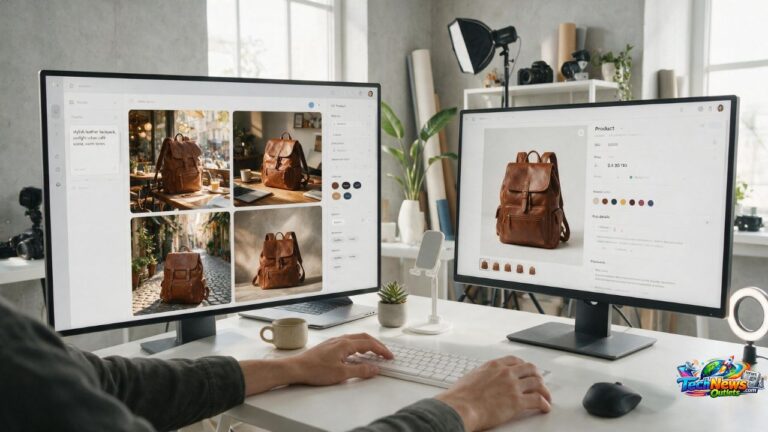
The ability to search product by image has changed how people discover products online because shoppers no longer need to know the exact product name, model, brand, colour, material, or style before beginning a search. Instead, a customer can upload a photograph, take a new picture, use a screenshot, or select part of an existing image and allow visual search technology to look for identical or similar products. This approach is especially useful for fashion, furniture, home decor, electronics, accessories, shoes, beauty products, tools, and other items that may be difficult to describe accurately with words.
Traditional ecommerce search depends heavily on text.
A shopper might type:
• Black leather shoulder bag
• Modern curved sofa
• White running shoes
• Gold pendant necklace
These searches can work well when the shopper understands the product.
The challenge begins when someone sees an item they like but cannot identify it.
Visual product search helps close that gap.
Instead of asking the shopper to describe the object, the image itself becomes part of the search query.
What Does Search Product by Image Mean?
Search product by image refers to using a photograph or other visual reference to identify a product, locate similar items, or discover places where related products may be available.
The process is often called:
• Visual search
• Image search
• Reverse image search
• Product image recognition
• AI visual shopping
• Image based product discovery
These terms are related, although they are not always identical.
Traditional reverse image search often tries to locate the same image or copies of it online.
Product visual search goes further by attempting to understand the object inside the picture.
For example, a visual search system may recognize that an uploaded photo contains a brown leather chair and then return visually related furniture.
How Search Product by Image Works
Visual search technology analyzes characteristics within an image.
Depending on the system, these can include:
• Shape
• Colour
• Pattern
• Texture
• Object type
• Product design
• Material appearance
• Logos
• Packaging
• Visible text
• Overall composition
Artificial intelligence models can transform these visual characteristics into information that can be compared with product catalogs and other indexed images.
The system then attempts to return relevant visual matches.
Exact Matches Versus Similar Matches
A visual result does not always mean the system has found the exact product.
Results can generally fall into two categories.
Exact or Near Exact Product Matches
These may show the same:
• Model
• Design
• Colour
• Packaging
• Product photograph
This is particularly useful when identifying a specific item.
Visually Similar Products
The system may instead find products with similar:
• Shapes
• Colours
• Patterns
• Materials
• Styles
This can still be useful when the shopper cares more about the appearance than the exact brand.
Understanding this difference prevents incorrect assumptions.
7 Proven Ways to Search Product by Image More Effectively
Image search can produce impressive results, but image quality and search technique significantly influence the outcome.
1. Search Product by Image Using a Clear Photograph
The quality of the source image matters.
Visual search systems perform better when the target object is easy to identify.
A good source image usually has:
• Clear focus
• Adequate lighting
• Visible product details
• Minimal blur
• Reasonable resolution
• Limited obstruction
A blurry image of a handbag taken from across a crowded room may be harder to match than a close photograph showing its shape, handles, pattern, and hardware.
Crop the Product Before Searching
If the image contains several objects, crop it around the item you want.
For example, a living room photograph might contain:
• Sofa
• Table
• Lamp
• Rug
• Artwork
If you want the lamp, remove as much of the unrelated scene as possible.
This gives the visual search engine a clearer signal.
Search Product by Image With Multiple Angles
If the first image does not produce a useful result, try another angle.
Different photographs may reveal:
• Brand markings
• Product shape
• Material
• Model numbers
• Fasteners
• Packaging details
• Unique design features
One additional angle can sometimes significantly improve identification.
2. Use Both an Image and Descriptive Words
Visual search becomes more precise when users combine images with text.
Suppose you photograph a green armchair.
The search results may include many green chairs.
You can refine the result with words such as:
• Velvet
• Dining chair
• Small
• Modern
• Swivel
• Beige
• Budget option
This allows the image to communicate the appearance while text communicates the shopper’s specific intention.
Text Helps Correct Visual Misunderstandings
Artificial intelligence does not always interpret images correctly.
A system may identify:
• A jacket as a shirt
• A decorative lamp as a sculpture
• A handbag as luggage
• A chair as a stool
Adding descriptive text can guide the search in the correct direction.
3. Look for Identifying Product Details
Sometimes the strongest clues are already visible in the photo.
Zoom in and check for:
• Brand name
• Model number
• Serial number
• Product code
• Label
• Barcode
• Logo
• Packaging
• Printed specifications
These details can make the search much more accurate.
A model number can often be more useful than the entire product photograph.
Use Visible Text Alongside Visual Search
If a product image contains readable text, search that text separately as well.
For example, a photograph of an electronic device may reveal:
• Manufacturer
• Product series
• Wattage
• Capacity
• Model identifier
Combining these clues with image search can narrow the results considerably.
4. Compare Several Visual Search Results
Do not assume the first matching result is correct.
Many products look similar.
This is particularly common with:
• Fashion
• Furniture
• Phone accessories
• Jewellery
• Tools
• Electronics
• Home decor
• Cosmetics
Several manufacturers may sell visually similar designs.
Compare the product carefully before purchasing.
Check Important Product Characteristics
Review:
• Dimensions
• Materials
• Colour
• Model
• Features
• Hardware
• Packaging
• Specifications
• Included accessories
For clothing, compare:
• Fabric
• Stitching
• Buttons
• Pattern
• Cut
• Fit
• Pockets
The closer these details match, the more likely you have found the correct product.
5. Search Product by Image Before Buying From an Unknown Seller
Visual search can be useful for investigating unfamiliar online listings.
Suppose a website advertises a product using an attractive photograph but provides very little information.
Searching the image may reveal:
• Other sellers using the same photograph
• The original manufacturer
• Similar products
• Alternative prices
• Different product descriptions
• Additional customer images
This information can help the buyer make a more informed decision.
Identical Photos Do Not Always Mean Identical Products
This is important.
Some online sellers reuse:
• Manufacturer images
• Supplier photographs
• Marketplace images
• Stock photography
A matching image therefore does not prove that two listings offer exactly the same product quality.
Always verify the actual seller and specifications.
6. Compare Prices After Identifying the Product
Once visual search helps identify an item, the next step is comparison.
Do not buy immediately.
Check several factors:
• Product price
• Shipping
• Taxes
• Delivery time
• Returns
• Warranty
• Seller reputation
• Product condition
A lower advertised price can become less attractive after shipping costs or limited return options are considered.
Compare the Exact Model
Price comparison only works when products are actually equivalent.
Two headphones may look nearly identical while offering different:
• Battery capacity
• Connectivity
• Accessories
• Warranty
• Audio features
The same principle applies to appliances, furniture, tools, clothing, and electronics.
7. Verify the Seller Before Completing the Purchase
Visual search helps find products.
It does not automatically determine whether a seller is trustworthy.
Before paying, review:
• Seller identity
• Contact information
• Return policy
• Warranty terms
• Product description
• Payment security
• Customer feedback
• Delivery terms
Avoid making purchasing decisions based entirely on an attractive image.
Search Product by Image for Fashion
Fashion is one of the most natural applications for visual search.
People frequently notice clothing without knowing how to describe the style.
Examples include:
• Dresses
• Jackets
• Shoes
• Bags
• Watches
• Sunglasses
• Jewellery
• Shirts
A photograph can communicate details that may be difficult to express in a search box.
Finding Similar Clothing
The exact product may no longer be available.
Visual search can still help find alternatives based on:
• Colour
• Shape
• Pattern
• Material
• Length
• Style
This makes image search useful for inspiration as well as exact identification.
Search Product by Image for Shoes
Shoes contain many distinctive design features.
A useful photograph may reveal:
• Sole shape
• Upper design
• Colour pattern
• Logo placement
• Lace structure
• Heel shape
Crop the shoe carefully if the original picture contains an entire outfit.
Search Product by Image for Furniture
Furniture can be surprisingly difficult to describe with text.
A shopper may recognize a sofa visually without knowing whether its style is:
• Mid century
• Contemporary
• Scandinavian
• Modular
• Curved
• Chesterfield inspired
Visual search removes much of this vocabulary problem.
Use Room Images for Inspiration
A person can search from an interior photograph and identify similar:
• Sofas
• Lamps
• Tables
• Chairs
• Rugs
• Storage units
• Decorative objects
For better results, focus the search on one object at a time when possible.
Search Product by Image for Electronics
Visual search can help identify:
• Smartphones
• Headphones
• Cameras
• Keyboards
• Chargers
• Smartwatches
• Speakers
• Computer accessories
Electronics require extra verification because several generations may look nearly identical.
Always Confirm the Model Number
A visual match is not enough when technical compatibility matters.
For example, phone cases designed for different smartphone generations may look nearly identical but have different:
• Dimensions
• Camera cutouts
• Button positions
• Charging compatibility
Check the model before ordering accessories or replacement parts.
Search Product by Image for Replacement Parts
Visual search may also help identify unknown components.
Examples include:
• Furniture hardware
• Appliance parts
• Automotive trim
• Electronic connectors
• Handles
• Hinges
• Fasteners
• Plumbing components
However, appearance alone should not determine compatibility.
Measure the Part
Before buying, confirm:
• Dimensions
• Thread size
• Connector type
• Material
• Voltage where applicable
• Model compatibility
• Manufacturer reference
A visually similar replacement part may still be unsuitable.
Search Product by Image for Home Decor
Visual shopping is particularly useful when decorating.
Users can identify similar:
• Lighting
• Mirrors
• Rugs
• Curtains
• Vases
• Wall art
• Shelving
• Tables
This makes it easier to recreate a particular design style.
Search for the Style, Not Only the Exact Product
Sometimes the goal is inspiration rather than duplication.
If the exact lamp in a photograph costs too much, use the image to discover alternatives with similar:
• Shape
• Finish
• Colour
• Size
• Design language
This can make visual search useful for budget conscious interior design.
Search Product by Image From a Screenshot
A screenshot can work very well.
People often discover products through:
• Social media
• Videos
• Blogs
• Online magazines
• Marketplace listings
• Messaging apps
Take a screenshot, crop the product, and use the resulting image for visual search.
Remove Unnecessary Interface Elements
Crop away:
• Captions
• Buttons
• Comments
• Navigation bars
• Unrelated products
This keeps the visual query focused.
Search Product by Image From Social Media
Social platforms are major sources of product inspiration.
A creator may wear an interesting jacket or show furniture without naming the product.
Image based search can help identify similar items.
However, remember that visual content may be:
• Edited
• Colour corrected
• Filtered
• AI generated
• Sponsored
• Old
The real product may therefore look different.
AI and Search Product by Image
Modern visual search increasingly uses artificial intelligence to understand what an image contains rather than relying only on identical image matching.
AI can analyze relationships between:
• Product type
• Visual style
• Shape
• Context
• Colour
• Material
This allows the system to return semantically related products even when the exact photograph does not exist in its database.
Multimodal Shopping Search
Multimodal search combines more than one type of input.
A shopper might use:
• Image plus text
• Screenshot plus question
• Product photo plus colour preference
For example:
Upload an image of a black chair and ask for a similar design in beige.
This approach gives shoppers greater control over visual discovery.
Limitations of Search Product by Image
Visual search is useful, but it is not perfect.
Results may be less accurate when:
• Image quality is poor
• Product is partially hidden
• Design is extremely generic
• Product is handmade
• Product is discontinued
• Image has heavy filters
• Multiple objects overlap
• Important identifying features are invisible
The system may find something similar rather than something identical.
AI Generated Product Images Create Additional Challenges
Some product style images online may be generated by artificial intelligence.
A visually attractive chair, shoe, watch, or interior product may not actually exist as a commercial item.
Visual search may return similar real products, but this should not be interpreted as proof that the original pictured product is available.
Privacy When Searching Products by Image
Uploading images to an online service can involve privacy considerations.
Before uploading a photograph, check whether it contains:
• Faces
• Children
• Addresses
• Documents
• License plates
• Computer screens
• Private interiors
• Financial information
Crop unnecessary personal details before searching.
Use the Smallest Necessary Image Area
If you only want to identify a handbag, there is usually no reason to upload an entire family photograph.
Crop the handbag first.
This improves both privacy and search accuracy.
Search Product by Image and Counterfeit Products
Visual similarity does not establish authenticity.
Counterfeit products may intentionally copy the appearance of well known products.
If a visual search identifies what appears to be a premium branded item, verify it through:
• Seller reputation
• Product code
• Packaging
• Authorized retail channels
• Warranty
• Materials
• Price
A suspiciously low price deserves additional investigation.
How Ecommerce Businesses Can Optimize for Visual Search
Visual discovery matters for retailers as well as shoppers.
Online stores can improve product discoverability through high quality product information.
Useful practices include:
• Clear product photography
• Multiple angles
• Consistent backgrounds
• Detailed product titles
• Accurate descriptions
• Structured product information
• Correct colour names
• Specific model data
• Useful image alt text
Strong images help both customers and visual systems understand the product.
Use Original Product Photography
Original photographs can show:
• Product details
• Materials
• Scale
• Packaging
• Real world context
This improves the shopping experience beyond visual search alone.
A Simple Search Product by Image Workflow
A practical workflow can follow these steps.
Step One
Choose the clearest available photograph.
Step Two
Crop around the target product.
Step Three
Run the visual search.
Step Four
Add descriptive text if results are too broad.
Step Five
Compare multiple candidate products.
Step Six
Check exact specifications.
Step Seven
Compare prices and sellers.
Step Eight
Review return and warranty terms.
Step Nine
Complete the purchase only after verifying the listing.
This approach combines visual convenience with sensible buying research.
Common Search Product by Image Mistakes
Searching a Busy Image Without Cropping
The search system may focus on the wrong object.
Assuming the First Match Is Correct
Similar design does not guarantee identical product.
Ignoring Dimensions
Size is difficult to judge from photographs.
Ignoring Seller Quality
Finding the item does not mean every seller offering it is reliable.
Buying Replacement Parts by Appearance Alone
Compatibility must be confirmed.
Uploading Private Images Unnecessarily
Crop sensitive details before searching.
Ignoring Total Purchase Cost
Always include shipping, taxes, and return costs when comparing offers.
Frequently Asked Questions
What does search product by image mean?
Search product by image means using a photograph, screenshot, or visual reference to identify a product or discover identical and visually similar products online.
Can I search product by image from a screenshot?
Yes. Screenshots can be used for visual product searches, and cropping the target item usually helps produce more focused results.
Can search product by image find the exact product?
Sometimes. Distinctive products may produce exact or near exact matches, while generic or unclear items may return visually similar alternatives instead.
How can I improve search product by image results?
Use a clear image, crop the target object, try multiple angles, add descriptive words, and compare identifying details such as logos, materials, model numbers, and dimensions.
Is search product by image useful for shopping?
Yes. It can help identify unknown items, find similar alternatives, compare sellers, discover different colours or styles, and research products seen in photos or videos.
Is it safe to search product by image online?
It can be, but users should protect privacy by cropping faces, addresses, documents, and other unnecessary personal information before uploading images.
Conclusion
Search product by image makes online shopping easier when a product is visually recognizable but difficult to describe with words. Clear photographs, careful cropping, text refinement, and comparison of several matches can significantly improve product identification. Buyers should still verify specifications, seller reputation, pricing, warranties, and compatibility before making a purchase. Used thoughtfully, visual search can turn almost any product photograph into a practical starting point for smarter product discovery.




One Comment