Laser Engraver for Wood: How to Choose the Right Machine for Woodworking
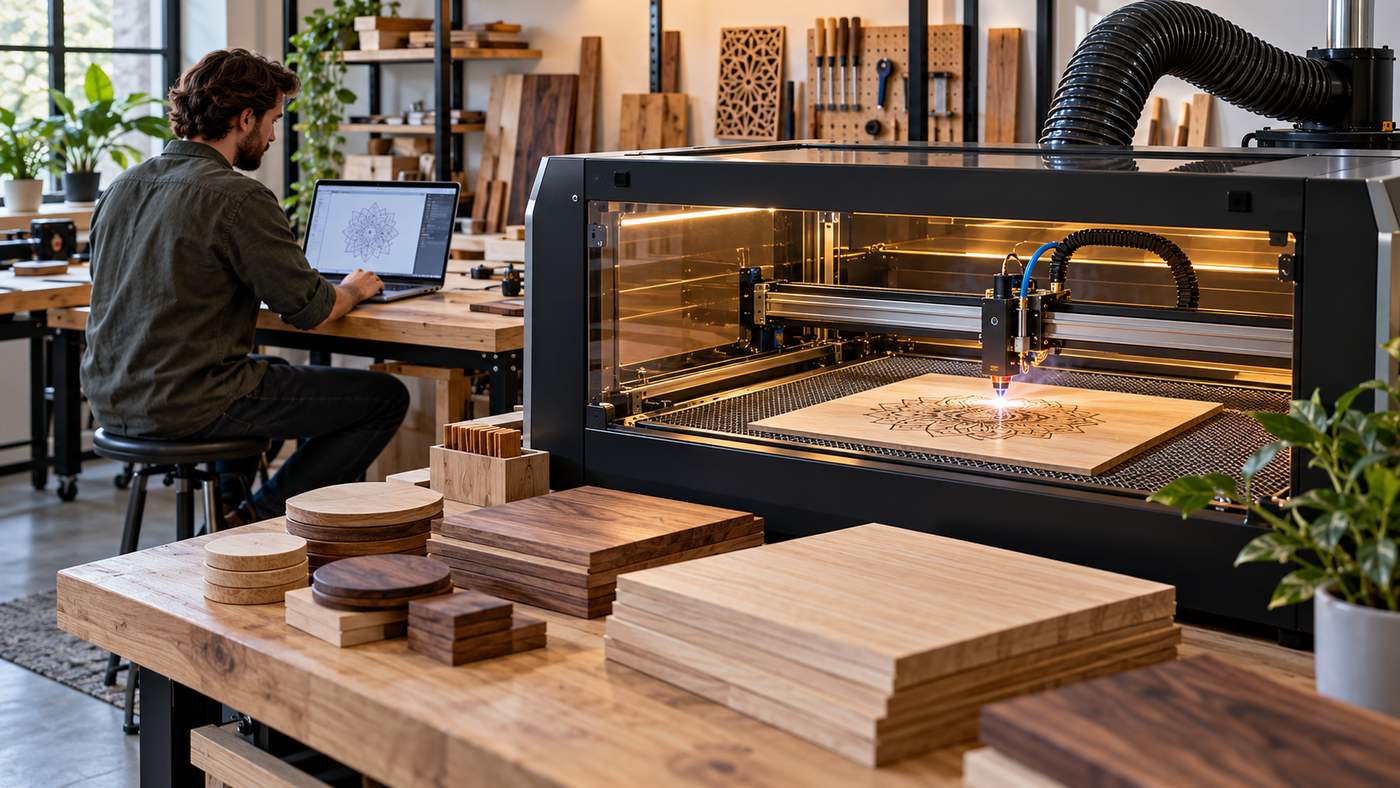
A laser engraver for wood can turn ordinary plywood, hardwood and wooden blanks into personalized signs, artwork, cutting boards, ornaments, gifts, business products and detailed decorative pieces. Modern desktop laser machines have made this technology accessible to hobbyists and small businesses, but choosing the right engraver requires more than comparing advertised wattage.
Two of the most common technologies used for wood are blue-light diode lasers and CO₂ lasers. Wood absorbs energy from both effectively, allowing the beam to heat, darken, vaporize or cut the material in a controlled pattern. xTool’s current material guidance identifies 455 nm blue diode lasers and 10.6 µm CO₂ lasers as particularly suitable technologies for wood processing.
The right machine depends on whether you primarily want to engrave photographs and text, cut wooden shapes, produce products commercially or experiment with woodworking as a hobby.
Other important factors include:
- Laser type
- Optical power
- Working area
- Enclosure
- Air assist
- Exhaust ventilation
- Software
- Material compatibility
- Safety controls
This guide explains seven major considerations before buying a laser engraver for wood.
What Does a Laser Engraver for Wood Do?
A laser engraver directs a concentrated beam onto the surface of wood.
The beam transfers energy to a very small area.
Depending on power, speed, focus and material, the process can:
- Darken the surface
- Remove a thin layer of wood
- Create recessed designs
- Cut completely through thin material
xTool explains that laser processing of wood works because the material absorbs laser energy effectively while its relatively low thermal conductivity keeps much of the heat concentrated around the processing area. That property makes wood suitable for detailed engraving, although excessive heat can also cause carbonization and wider burn marks.
Engraving vs Cutting
Engraving removes or darkens material primarily at the surface.
Common engraving projects include:
- Names
- Logos
- Photographs
- Maps
- Decorative patterns
- Personalized messages
Cutting uses enough energy to penetrate through the material.
Common cut projects include:
- Ornaments
- Signs
- Boxes
- Puzzles
- Models
- Decorative panels
A machine that excels at engraving is not automatically the fastest option for cutting thick wood.
Your intended projects should therefore determine the machine.
1. Choose Between Diode and CO₂ Lasers
The first major decision is laser technology.
For woodworking, the two most practical choices are generally:
Diode laser
or
CO₂ laser
Both can engrave wood effectively, but they serve somewhat different users.
Diode Laser Engravers
Desktop diode machines use semiconductor laser modules, commonly producing blue light around 455 nm.
They are popular because they can be:
- More affordable
- Compact
- Easy to maintain
- Suitable for beginners
- Good for detailed engraving
xTool describes diode machines as an affordable option particularly suited to hobbyists and people entering laser woodworking.
Who Should Choose a Diode Laser?
A diode machine may be a strong choice if you want to create:
- Wooden signs
- Cutting boards
- Personalized gifts
- Decorative artwork
- Small craft products
- Light cutting projects
Entry-level machines are particularly attractive when engraving is more important than high-volume cutting.
Diode Limitations
Compared with stronger CO₂ machines, a diode laser may require more time or multiple passes for thicker materials.
That matters for businesses.
If one machine takes several minutes longer per product, the difference can become significant when producing hundreds of items.
CO₂ Laser Engravers
CO₂ laser machines commonly use infrared light around 10.6 µm.
Wood absorbs this wavelength efficiently.
According to xTool, CO₂ systems are especially well suited to cutting and engraving wood and are often attractive for small businesses because of their repeatability and stronger processing capability.
CO₂ Advantages
Depending on the machine, benefits may include:
- Faster cutting
- Greater cutting capability
- Larger workspaces
- Professional production capacity
- Strong compatibility with wood and acrylic
CO₂ Considerations
CO₂ machines can be:
- Larger
- More expensive
- More complex
- Dependent on cooling systems in some designs
A hobbyist making occasional personalized gifts may not need that additional capacity.
A business cutting large quantities of plywood every day might.
What About Fiber Lasers?
Fiber lasers are primarily designed for metals and certain plastics.
They are generally not the first choice for wood.
xTool’s woodworking guidance specifically recommends diode and CO₂ technology for wood and notes that fiber lasers are more commonly used for metal processing.
If wood is your main material, focus on diode or CO₂ systems.
2. Understand Laser Power Before Buying
Laser advertising can make power specifications confusing.
A machine may prominently display a large electrical number even though the more useful specification for processing performance is usually the laser’s optical output.
Lower-Power Machines
Lower optical-power diode machines can be excellent for engraving.
They may produce detailed:
- Text
- Photos
- Patterns
- Logos
If engraving is your primary objective, enormous cutting power may not be necessary.
Higher-Power Machines
Additional power becomes more useful when cutting.
A stronger machine can generally process wood more efficiently, although results still depend on:
- Wood species
- Thickness
- Moisture
- Glue
- Focus
- Airflow
Power alone therefore does not tell you exactly how thick a machine can cut.
Avoid Buying Based on Wattage Alone
Two machines with apparently similar power can perform differently because of:
- Beam shape
- Focus quality
- Motion system
- Air assist
- Optics
- Software
- Mechanical rigidity
Look at real-world performance on the types of wood you intend to use.
3. Choose the Correct Working Area
The working area determines the maximum practical size of your project.
A small engraver may work perfectly for:
- Coasters
- Keychains
- Small plaques
- Ornaments
It becomes restrictive if you later want to make:
- Large wall signs
- Furniture panels
- Oversized maps
- Batch production
Measure Your Typical Project
Before buying, estimate the largest product you realistically expect to make.
Then allow additional space.
A slightly larger bed provides flexibility for:
- Fixtures
- Material positioning
- Batch engraving
Pass-Through Capability
Some enclosed machines provide pass-through or conveyor systems for long pieces.
xTool’s plywood guidance, for example, describes conveyor-based setups capable of processing significantly longer objects than the standard work bed.
This can be useful for:
- Long wooden signs
- Shelves
- Furniture components
If large projects are part of your business plan, investigate this before purchase rather than trying to modify the machine later.
4. Prioritize Air Assist and Ventilation
A laser does not simply create light.
Processing wood produces:
- Smoke
- Fine particles
- Odor
- Carbonized residue
Good airflow is therefore extremely important.
What Is Air Assist?
Air assist directs compressed airflow toward the point where the laser meets the material.
xTool’s technical guidance says air assist can help:
- Remove smoke and carbon dust
- Keep the processing path clearer
- Reduce lens contamination
- Limit scorching
- Improve cutting performance
Air Assist for Cutting
Air assist is particularly useful when cutting wood because smoke and debris can accumulate in the cut.
Removing them can produce cleaner edges.
Air Assist for Engraving
Very strong airflow is not always necessary during engraving.
xTool notes that excessive airflow during engraving can move debris across the material and create discoloration, which is why some automated systems reduce airflow for engraving tasks.
This is another reason adjustable air assist can be valuable.
Ventilation Is Essential
Wood smoke should not simply accumulate in your workspace.
xTool specifically recommends effective ventilation and smoke extraction during wood laser processing.
An enclosed machine commonly uses an exhaust hose to direct smoke outside or through an appropriate filtration system.
Indoor Workshops
If the machine will operate inside:
- Office
- Garage
- Spare room
- Workshop
plan the exhaust route before buying.
Do not assume opening a window near the machine is equivalent to a designed extraction system.
5. Choose the Right Wood Materials
Not every piece of wood behaves identically under a laser.
Different woods vary in:
- Density
- Resin
- Grain
- Moisture
- Color
- Glue content
This affects engraving contrast and cutting performance.
Basswood
Basswood is popular among laser hobbyists because it is relatively uniform and easy to process.
It is commonly used for:
- Crafts
- Models
- Decorative cutting
- Signs
Birch Plywood
Birch plywood is widely used for:
- Signs
- Boxes
- Wall art
- Laser-cut products
However, plywood quality matters.
Internal glue layers and voids can affect cutting consistency.
Maple
Maple’s lighter color can produce strong visual contrast when engraved.
It works well for:
- Cutting boards
- Signs
- Gifts
Walnut
Walnut is naturally darker.
Engraving can therefore appear subtler than on very light-colored wood.
Its premium appearance makes it popular for:
- Awards
- Luxury gifts
- Personalized home products
Bamboo Products
Many bamboo boards engrave attractively, but bamboo construction varies significantly.
Test before beginning a large production batch.
Know What Is Actually Inside the Material
This is one of the most important safety considerations.
A board may look like ordinary wood while containing:
- Adhesives
- Coatings
- Paint
- Preservatives
- Unknown chemicals
Glowforge advises users to confirm that custom materials are laser-compatible by contacting the manufacturer, consulting safety data sheets or getting expert guidance. It specifically notes that some plywood uses glue that may not be laser-compatible.
Never assume that every wood-like material is safe simply because its surface appears wooden.
6. Look for Safety Features, Not Just Performance
Laser engravers are powerful tools.
The FDA classifies lasers according to hazard level.
Class IV lasers can create immediate eye and skin hazards from direct or reflected exposure and can also present a fire hazard.
Some powerful open-frame laser engravers can expose users to higher-risk laser radiation if operated improperly.
Enclosed Machines
An enclosure can significantly improve the user environment by helping contain:
- Laser radiation
- Smoke
- Debris
Look for machines with safety features such as:
- Enclosure
- Door interlocks
- Emergency stop
- Flame detection
- Over-temperature monitoring
No feature eliminates the need for responsible operation.
Verify Laser Labels
The FDA says laser products should display appropriate certification and hazard labeling, including information about the laser class and power output.
Before purchasing an unfamiliar laser online, verify that the manufacturer provides clear safety and compliance documentation.
Never Leave Wood Processing Unattended
Wood is combustible.
A laser creates heat.
xTool’s solid-wood safety guidance specifically tells users to maintain ventilation, use appropriate protective measures and avoid leaving the machine unattended.
A fire can develop quickly if material ignites.
7. Evaluate Software and Workflow
Hardware specifications receive most of the attention, but software can determine how enjoyable the machine is to use.
Laser software controls:
- Design placement
- Power
- Speed
- Passes
- Layers
- Focus
- Material settings
Popular ecosystems may use:
- Manufacturer software
- LightBurn
- LaserGRBL
- Other dedicated applications
Glowforge notes that users working with other laser machines may use programs such as LightBurn, xTool Creative Space, RDWorks or LaserGRBL depending on the specific machine.
Beginner-Friendly Software
Beginners may prefer software with:
- Material presets
- Camera alignment
- Automatic focus
- Simple design tools
Advanced Software
Experienced users may want:
- Detailed layer control
- Vector editing
- Variable power
- Batch processing
- Custom material libraries
Check software compatibility before purchasing.
An excellent machine is frustrating if it does not support your preferred workflow.
Camera Positioning Can Save Time
Some enclosed laser engravers include a camera above the working area.
This allows the software to display the material on screen so a design can be positioned visually.
A camera can be particularly convenient for:
- Wooden blanks
- Cutting boards
- Irregular objects
- Batch products
Accuracy varies among systems.
For precision production work, fixtures and jigs may still be required.
Autofocus vs Manual Focus
The laser beam needs correct focus.
Some machines focus automatically.
Others require manual positioning.
Autofocus
Advantages include:
- Faster setup
- Easier material changes
- Beginner convenience
Manual Focus
Manual systems can still produce excellent results.
They simply require more operator involvement.
For a production business processing different material thicknesses all day, automatic focusing can save meaningful time.
Honeycomb Work Beds
A honeycomb bed supports material while allowing airflow beneath it.
This can improve cutting results.
xTool recommends honeycomb or slatted supports for cutting because they improve ventilation beneath the material and reduce direct contact that can contribute to heat accumulation and backside carbonization.
This accessory is especially useful if you plan to cut rather than only engrave.
How to Reduce Burn Marks on Wood
Laser engraving naturally involves heat, so some darkening is expected.
Excessive scorching, however, can reduce quality.
xTool recommends several methods that can help reduce unwanted carbonization, including:
- Appropriate masking
- Air assist
- Honeycomb support
- Effective exhaust
- Correct processing parameters
The exact settings vary by machine and wood.
Test small material samples before processing expensive blanks.
Laser Engraver for Wood for Beginners
A beginner does not necessarily need the most powerful machine available.
A strong starter setup usually prioritizes:
- Enclosure
- Easy software
- Air assist
- Reliable focus
- Good documentation
- Replacement parts
- Manufacturer support
Beginner Project Ideas
Good first projects include:
- Wooden coasters
- Name signs
- Simple ornaments
- Keychains
- Gift tags
- Cutting boards
Start with uncomplicated designs while learning how different woods react.
Laser Engraver for Wood for Small Business
Business owners should evaluate equipment differently.
Production capacity matters.
Important questions include:
- How many products can be completed per hour?
- How large is the work area?
- Can several items be engraved at once?
- How quickly can materials be loaded?
- Are replacement parts available?
- What happens if the machine fails?
Repeatability Matters More Than Maximum Power
Commercial work requires consistent results.
Customers expect product number 100 to look like product number 1.
Features that help repeatability include:
- Camera alignment
- Jigs
- Reliable focusing
- Stable motion system
- Saved material profiles
A slightly slower but dependable machine may be more valuable than one that produces inconsistent work.
Can You Make Money With a Wood Laser Engraver?
Yes, but the machine alone does not create a profitable business.
Common products include:
- Personalized cutting boards
- Wedding signs
- Business logos
- Wooden maps
- Ornaments
- Awards
- Home décor
- Corporate gifts
Profit depends on:
- Material cost
- Machine time
- Labor
- Packaging
- Marketing
- Shipping
Before buying an expensive machine, calculate how many products you would need to sell to recover the investment.
Laser Engraver vs CNC Router for Wood
Both tools can customize wood but work differently.
Laser Engraver
Best for:
- Detailed surface artwork
- Fine text
- Thin cutting
- Photographic engraving
CNC Router
Best for:
- Deep carving
- Thick wood
- 3D relief
- Furniture components
Some workshops use both.
The laser handles detailed graphics while the CNC performs deeper material removal.
Common Laser Engraver for Wood Buying Mistakes
Buying Only by Advertised Power
Power is important, but beam quality, software and mechanics matter too.
Ignoring Ventilation
Wood laser processing generates significant smoke.
Buying Too Small a Work Area
Many users outgrow compact machines after moving into larger signs or batch production.
Using Unknown Materials
Coatings, adhesives and treatments can create unsafe fumes or poor results.
Choosing an Open Machine Without Understanding Safety
High-powered laser exposure can cause serious injury.
Assuming Every Plywood Cuts the Same
Glue layers and internal voids can change results dramatically.
Leaving the Laser Unattended
Wood is combustible, and laser processing carries fire risk.
Frequently Asked Questions
What type of laser engraver for wood is best?
Diode lasers are often suitable for beginners and hobbyists, while CO₂ machines generally provide faster and stronger wood cutting capability for larger or commercial workloads.
Can a laser engraver cut wood as well as engrave it?
Yes, many diode and CO₂ machines can both engrave and cut wood. Cutting capability depends on optical power, wood type, thickness, focus and airflow.
Is air assist necessary for a wood laser engraver?
It is highly useful, especially for cutting. Air assist helps remove smoke and debris, reduce lens contamination and limit scorching around the processing area.
Do I need ventilation for laser engraving wood?
Yes. Wood processing generates smoke and particles, and manufacturers recommend effective ventilation and smoke extraction.
What wood is good for laser engraving?
Basswood, birch plywood, maple, walnut and many other untreated woods can engrave well. Performance varies according to grain, density, moisture and adhesives.
Are laser engravers dangerous?
They can be. Higher-powered lasers can cause serious eye or skin injury, and Class IV lasers can also create fire hazards. Appropriate enclosures, safety controls, labeling, ventilation and responsible supervision are essential.
Conclusion
A laser engraver for wood can be an excellent tool for personalized crafts, woodworking, home décor and small-business production, but the best machine depends on your real projects. Diode lasers offer an accessible starting point, while CO₂ systems provide greater cutting capability for heavier workloads. Before buying, compare optical power, working area, air assist, ventilation, software and safety features rather than focusing on wattage alone. A properly chosen and safely operated machine can deliver precise, repeatable wood engraving for years