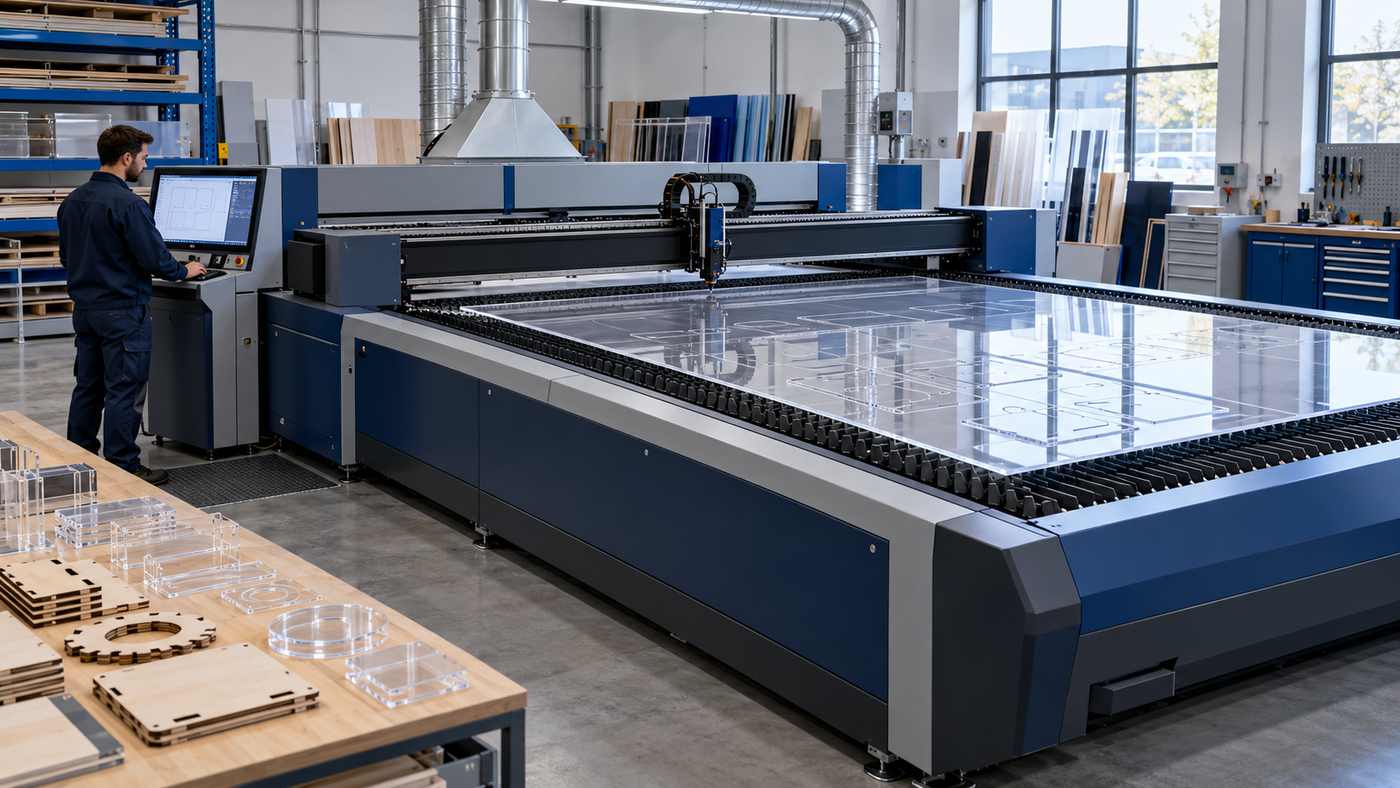
F130-L Laser Cutter Machine: A Practical Guide to Better Production Decisions
The F130-L Laser Cutter Machine is a large-format CO2 system that MimoWork positions for wood and acrylic sheet processing. For a fabrication business, the important buying question is how the quoted configuration performs on its own materials, designs, and production schedule. A suitable machine should support the complete workflow, from loading sheets to inspecting finished parts.
That assessment takes more than comparing laser power. Material quality, cutting requirements, handling arrangements, extraction, software, and support can all influence the result.
A sign maker producing detailed acrylic components may have different priorities from a workshop cutting plywood display panels. Even when both businesses use similar sheet sizes, their acceptable edge finish, assembly requirements, and daily output can differ.
This guide explains the published specifications and seven practical checks to help you evaluate the machine. Performance expectations should be confirmed through application testing rather than assumed from a specification alone.
Understanding the F130-L Laser Cutter Machine Specifications
MimoWork lists the following specifications:
- Working area: 1300 × 2500 mm.
- Laser power options: 100W–600W.
- Laser source: CO2 glass laser tube.
- Maximum listed speed: 600 mm/s.
- Listed acceleration: 4000 mm/s².
- Motion system: servo-driven gear rack.
- Cooling: water chiller.
The manufacturer also describes ball-transfer sheet handling, a hybrid optical path, water-cooled optics, a knife-strip table, and zoned extraction. Its listed optional upgrades include autofocus, a safety light curtain, ball-screw drives, and a hybrid cutting head. Confirm the supplied configuration in writing. Mimowork Laser
Read Specifications in Their Proper Context
A maximum speed figure does not tell you how quickly a particular material will be cut to an acceptable standard.
Similarly, laser wattage alone does not establish achievable thickness, edge quality, or total production output.
Ask the supplier to connect each performance claim to a defined material, thickness, design, and acceptance standard. This makes the information useful for your workshop.
1. Match the Working Area to Your Actual Jobs
A larger bed can reduce the need to divide material before processing. Whether that saves meaningful time depends on your existing workflow.
Start with the sheet dimensions you purchase and the parts you regularly produce.
Include unusually long components, awkward shapes, and jobs that currently require repositioning. These are often the applications where bed size deserves the closest attention.
Check Usable Space and Loading Access
Ask the supplier to demonstrate how your sheets are positioned.
Confirm whether clamps, reference stops, edge margins, or fixtures reduce the usable area for your intended job.
Also consider how material reaches the machine. A sheet that fits the cutting area still needs a practical route through the building and into position.
Measure doorways, aisles, turns, and storage access before finalising the installation plan.
Evaluate Layout Efficiency
Create a representative arrangement of parts using your normal production files.
Check how many complete sets fit on a sheet and how much material remains unused.
A layout that looks efficient may still create problems if small components become difficult to retrieve or if the remaining sheet becomes unstable.
Ask whether the proposed workflow allows reusable offcuts to be identified and stored.
Make the F130-L Laser Cutter Machine Trial Representative
Use a complete production layout during the demonstration. One isolated shape cannot reveal how a full sheet behaves during cutting, unloading, and sorting.
The goal is to assess the job you will actually sell.
2. Select Power Through Material Testing
The best power configuration is the one that meets your application requirements reliably.
Begin by listing your most common materials and thicknesses. Separate frequent work from occasional jobs that might be outsourced more economically.
Then define the finish you need. A decorative edge, a concealed internal component, and an accurately fitting assembly may require different acceptance criteria.
Test Your Own Material Supply
Send samples from the suppliers you expect to use.
Include the actual grade, thickness, surface treatment, and protective film where relevant. Label the samples so the results can be matched to the material tested.
For plywood, include more than one sheet or batch if consistency is important. For acrylic, identify whether it is cast or extruded.
Trotec’s material guidance distinguishes cast and extruded acrylic because their manufacturing methods affect processing characteristics. Both can be laser processed, but their behaviour should not be treated as identical. troteclaser.com
Ask for Measured Results
Request the finished samples and a record of the test conditions.
Useful information includes:
- The configuration used.
- Material identification and thickness.
- Time required for the demonstrated job.
- Number of acceptable parts produced.
- Any cleaning or finishing performed.
- Observed defects or rejected pieces.
A successful test should demonstrate repeatable, saleable output. Simply separating a part from the sheet may not meet your quality standard.
Avoid Buying for an Unverified Maximum
If thick material is central to your business, test it directly.
Do not build a purchasing decision around a headline thickness or a short demonstration with unknown conditions. Ask for repeat runs using your actual design and material.
3. Define Cut Quality Before Comparing Machines
“Good quality” means different things to different buyers.
A display manufacturer may prioritise appearance. A model maker may care more about fit. A workshop producing assembled products may need consistent dimensions across repeated batches.
Write those requirements down before requesting a demonstration.
Examine Finished Edges
Inspect samples under the lighting conditions your customers will use.
Look for visible marks, uneven edges, discolouration, residue, or defects that would require additional work.
Check both sides of the component. A presentable top surface does not establish that the underside is acceptable.
For clear parts, examine the edge from several angles. For wooden components, assess whether the finish matches the intended appearance of the product.
Measure Fit With Real Assemblies
Use mating parts from your own designs.
Assemble tabs, slots, locating features, and joints rather than judging them only by eye.
If a part needs sanding or adjustment, record that time. Small amounts of repeated finishing can become significant across a large order.
Ask how material thickness variation is handled in the drawing and setup process.
Compare Repeatability Across the Bed
Request repeated parts from different positions within a representative layout.
Measure the features that matter to your product and compare the results.
This is a practical acceptance exercise, not a substitute for the supplier’s formal accuracy specification. Agree on the measurement method and tolerances before testing so both parties interpret the results consistently.
4. Measure Complete Production Time
A laser can cut quickly while the overall job remains slow.
Preparing files, locating material, loading sheets, removing components, cleaning edges, and checking dimensions all contribute to delivery time.
When evaluating the F130-L Laser Cutter Machine, measure the full sequence rather than watching only the cutting head.
Break the Job Into Stages
Record the time required for:
- File preparation and checking.
- Material retrieval and loading.
- Setup and positioning.
- Cutting.
- Unloading and sorting.
- Finishing and inspection.
This shows where the process actually spends time.
If unloading takes longer than cutting, increasing laser power may have less effect than improving part collection or batch organisation.
Use Accepted Parts as the Output Measure
A useful comparison is the number of acceptable components completed during a defined period.
Include rejects, repeat work, and necessary finishing.
For example, a faster demonstration that produces several unusable pieces may deliver less practical value than a slower run with consistent results.
Also record operator involvement. A process that depends on constant manual correction may be difficult to repeat during a busy shift.
Test More Than One Job Type
Choose several representative applications.
Include your most frequent job, a demanding job, and a small batch with multiple changeovers.
This helps reveal whether the proposed setup fits your overall workload or performs well only on a narrow demonstration.
5. Plan the Workshop Around the Machine
Installation planning should begin before delivery.
Request an approved layout drawing showing the machine, auxiliary equipment, access requirements, and service clearances.
Use installed dimensions rather than assuming transport or packaging measurements describe the operating footprint.
Confirm Utilities for the Quoted Configuration
Ask for written requirements covering electrical supply, cooling, extraction, and any required compressed air or gases.
Provide the supplier with your available site services. Have the relevant qualified professionals assess the installation requirements.
Also confirm where auxiliary equipment will sit and how operators will reach it for routine checks.
A technically suitable machine can still create avoidable disruption if these arrangements are left unresolved.
Design Extraction for the Application
Laser processing can generate airborne contaminants. OSHA guidance identifies adequate ventilation as a necessary control for potentially hazardous fumes and vapours produced during laser cutting and related processes. Occupational Safety and Health Administration
Ask the supplier and extraction specialist to assess your intended materials, operating pattern, ductwork, and discharge or filtration arrangement.
A fan specification alone does not establish that an installed system will perform adequately.
Discuss filter servicing, airflow checks, and how declining extraction performance will be detected.
Establish Material Approval and Operating Procedures
Do not process unidentified plastics or assume every sheet material is suitable.
Epilog advises checking material composition and warns against processing PVC-containing materials because of hazardous and corrosive emissions. Obtain supplier documentation and machine-specific approval for the materials you plan to use. Epilog Support Center
Arrange operator training, fire-response procedures, and the safeguards required for the supplied machine. Laser cutting should remain attended; combustible materials can ignite during processing. epiloglaser.com
6. Verify Software, Options, and Application Support
Software affects how easily a design becomes a repeatable production job.
Ask the supplier to import your existing files and demonstrate the complete process.
Check scale, units, curves, text conversion, and duplicate lines. An attractive preview is not enough if the production file changes unexpectedly during import.
Follow a File From Import to Output
Use a design containing the types of detail you normally produce.
Observe how the operator assigns processing order, checks the layout, and saves the job.
Ask how settings are documented and how different operators access approved versions.
If your workflow requires nesting, printed registration, batch management, or network transfer, confirm those functions explicitly. Do not assume they are included because similar machines offer them.
Separate Included Equipment From Options
Request an itemised quotation.
For each option, identify the practical problem it solves and how its benefit will be demonstrated.
Check compatibility between proposed upgrades and the final configuration. Also ask whether later installation is possible and what additional work would be required.
This prevents a purchasing decision based on features that are pictured or discussed but absent from the quoted package.
Confirm Support Before You Need It
Ask who handles installation, training, application questions, and faults.
Establish support hours, communication methods, spare-parts availability, and the process for diagnosing downtime.
Request maintenance instructions and clarify which tasks operators can perform themselves. Any work requiring specialist service should be identified before the machine becomes essential to delivery commitments.
7. Calculate Cost per Accepted Job
The purchase price is only one part of ownership.
Include transport, installation, training, auxiliary equipment, software charges, consumables, maintenance, and expected service costs.
Then connect those expenses to realistic production demand.
Build the Calculation Around Existing Work
Start with orders you already receive or have a credible basis for forecasting.
Estimate the time and material needed for each representative job, using demonstrated results where possible.
Include labour for preparation, handling, finishing, and inspection.
Keep assumptions visible. A calculation becomes less useful when uncertain demand is treated as guaranteed utilisation.
Compare the Current Alternative
Consider what happens if you do not buy the machine.
Your alternative might be outsourcing, continuing with existing equipment, using another process, or delaying certain products.
Compare lead time, quality control, flexibility, and total cost.
For a workshop with irregular demand, outsourcing some work may remain useful even after an equipment purchase.
Allow for Maintenance and Downtime
Do not assume every available hour will become productive cutting time.
Include scheduled maintenance, setup changes, training, and reasonable disruption in your planning.
Ask for written warranty terms and clarify exclusions, consumable coverage, and service arrangements.
The objective is a realistic operating model that remains workable when production is less smooth than the demonstration.
Questions to Ask Before Placing an Order
A clear purchasing discussion should produce answers specific to your application.
Ask which configuration was used for your samples and whether it matches the quotation. Confirm what quality criteria the supplier agrees to demonstrate during acceptance.
Discuss the installation schedule, training scope, documentation, and responsibilities at delivery.
If metal processing or another secondary application matters to you, request separate testing and written confirmation of the necessary configuration. Avoid treating a general material claim as evidence that every alloy, thickness, or process is supported.
Finally, identify unresolved questions before paying a deposit. A short list of written clarifications is easier to manage than assumptions discovered during installation.
Prepare an Acceptance Test for Delivery
Agree on an acceptance procedure before the machine ships.
Use approved sample files and clearly identified material. Specify the measurements, finish requirements, and production steps that will be checked.
Include a demonstration of required safeguards, normal shutdown, routine maintenance, and the agreed operator training.
Keep copies of the accepted samples, settings, and inspection records.
This creates a shared reference for future troubleshooting. If output changes later, you can compare the current process against a documented starting point.
Acceptance should confirm the agreed capability of the supplied system. It should not depend on unfamiliar material or a newly introduced design that neither party has tested.
Common Buying Mistakes to Avoid
One common mistake is treating maximum speed as normal cutting speed.
Another is choosing power before defining the material and quality requirements.
Buyers can also underestimate handling space, extraction installation, and the time needed to finish or sort components.
A further mistake is assuming that every advertised option is included. Resolve that through an itemised specification rather than relying on product photographs.
Finally, avoid judging long-term suitability from a single successful sample. Repeat the work, inspect the results, and confirm support arrangements.
The strongest purchase decision connects the machine’s demonstrated capability to a clear production need.
Frequently Asked Questions
What is the F130-L Laser Cutter Machine intended for?
MimoWork positions it for large-format wood and acrylic sheet processing. Confirm suitability for your specific material and product requirements.
What working area does the machine offer?
The published working area is 1300 × 2500 mm. Verify usable margins, fixtures, and loading arrangements against your actual sheets.
Which laser power should I choose?
Choose power through material testing. Your thickness, required finish, production volume, and demonstrated cycle time should guide the decision.
Does maximum speed indicate normal cutting performance?
No. Actual job performance depends on the material, design, settings, and required quality. Compare complete production cycles.
Can I assume all listed upgrades are included?
No. Request an itemised quotation identifying the equipment, software, safeguards, and options supplied with your configuration.
What should I request before buying?
Request representative samples, recorded test conditions, installation requirements, an acceptance procedure, training details, and written support terms.
Conclusion
The F130-L Laser Cutter Machine deserves evaluation against the work your business actually produces. Test your materials, measure complete job time, and define acceptable quality before choosing a configuration. With clear installation plans and written acceptance criteria, you can make a more informed decision about its place in your workshop.